
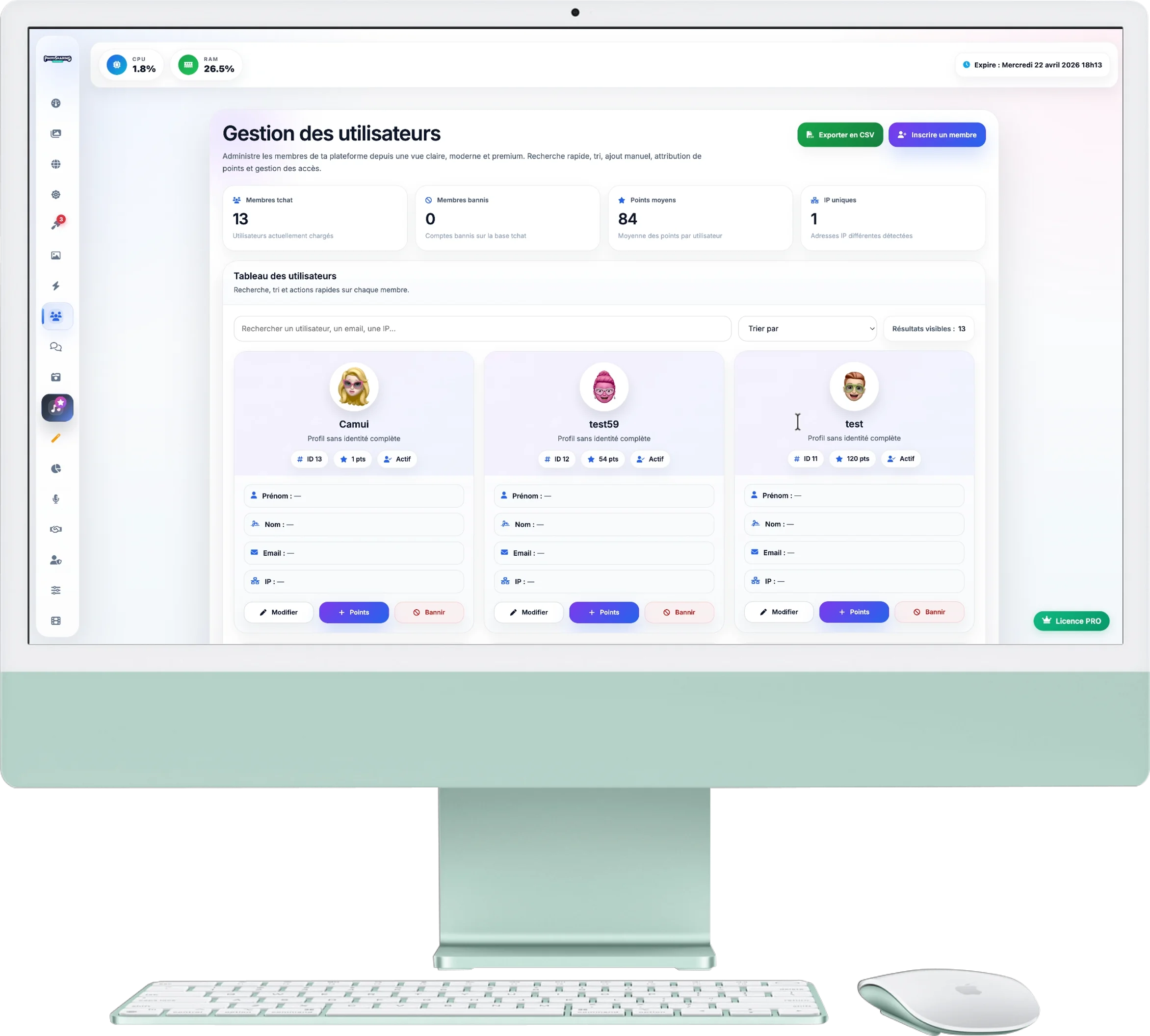
User Management
This page allows you to administer all the guests who have registered for your event (to participate in the chat or the photo competition). You have full control over their profiles, points and access.
1. Overview & Export
The top of the page gives you a summary of your guest base:
- Indicators: Track sign-ups, bans, average points and participation indicators.
- Export as CSV: An export button allows you to download the complete list of your participants (very useful for building a contact list after the event).
2. Advanced Search
Find any participant instantly:
- Use the search bar to find a guest by their nickname, first name or email.
- The drop-down menu allows you to sort the list (by points, in alphabetical order, by date of registration or to display the banned ones first).
3. Manage a Profile
Each user card contains the guest's information and several quick action buttons:
- Edit: Allows you to correct the guest's information or assign them a new "Memoji" avatar.
- Points: Manually add points to a user (handy for rewarding a winner in a physical game during your event).
- Ban / Unban: Instantly blocks user access to chat and sending photos.
4. Security and blocking
PhotoSharing includes security controls: if a banned guest tries to bypass the block, an alert may appear on their profile inviting you to check their activity.
5. Manual Registration
The blue button Register a member (top right) allows you to manually create an account for a guest directly from the organizer area, without them needing to use the event QR Code.