
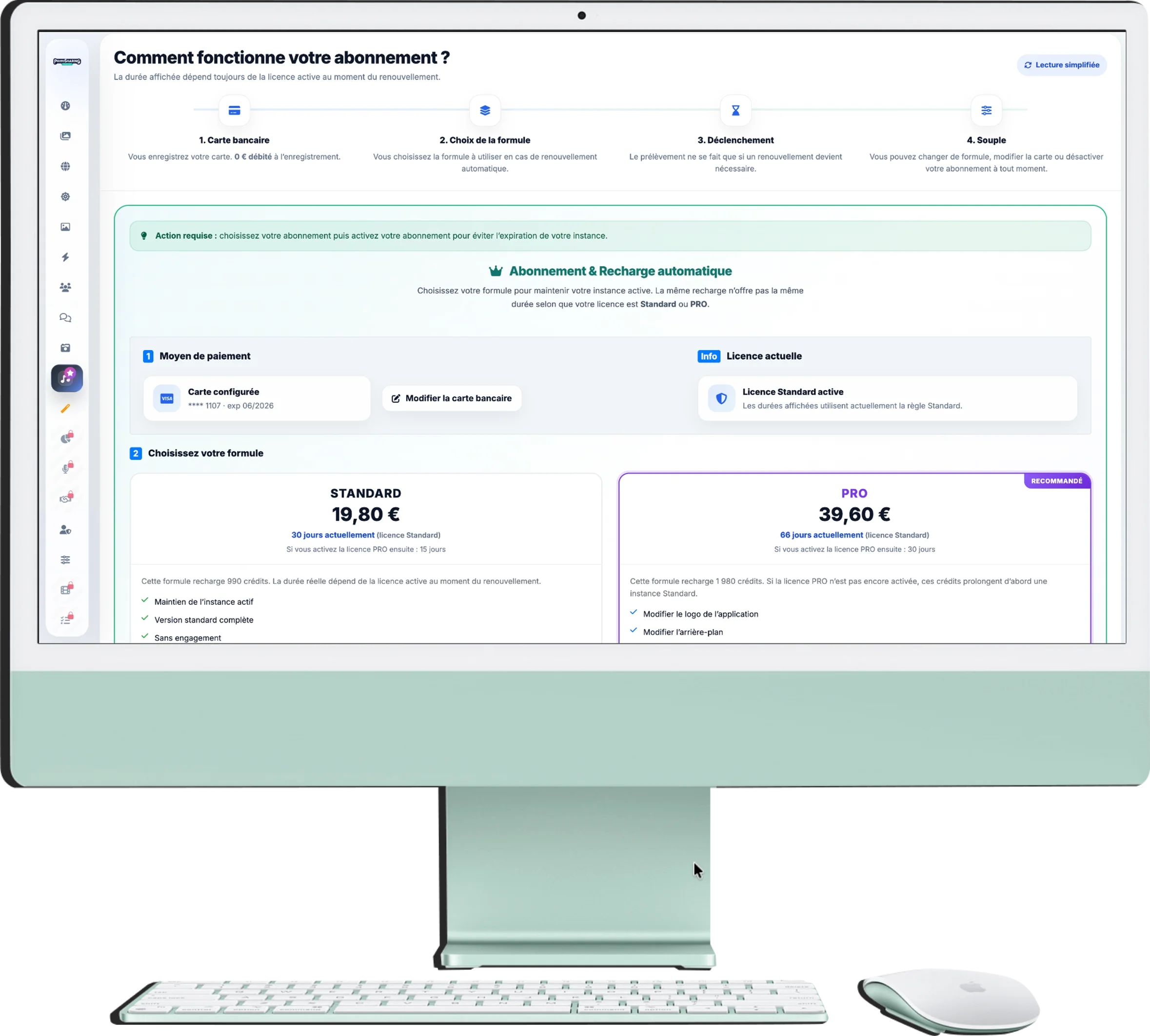
Subscription & AI Credits
This section allows you to manage your instance's subscription as well as the credits used for AI features. It was designed to be simpler: you register your card, you choose a plan, then you activate or suspend your subscription in a few clicks.
1. General operation
At the top of the page, a frieze summarizes the operating principle:
- 1. Credit Card: you register your bank card. No immediate debit is not performed during recording.
- 2. Choosing the plan: you then select the formula Standard or PRO according to your needs.
- 3. Automatic renewal: harvesting only triggers if it becomes necessary to prevent your instance from expiring.
- 4. Flexible management: You can modify your plan, change your bank card or suspend your subscription at any time.
2. Automatic subscription
This is the recommended option to avoid any service interruption:
- How it works: choose a plan, then click on Activate my subscription.
- No commitment: you can then pause it at any time via the button Pause my subscription.
- Standard plan: the amount of 19,80 € corresponds to 30 days with Standard licence, or 15 days if your instance is under PRO license at the time of renewal.
- PRO plan: the amount of 39,60 € corresponds to 66 days with Standard licence, or 30 days if your PRO license is already active.
3. Important for the PRO plan
Choosing the PRO offer on the subscription page is not enough to automatically activate the PRO license on your instance:
- After subscribing to the plan 39,60 €, open the menu Personalize the event, then the area dedicated to the PRO license.
- This menu is where you finalise thePRO license activation.
- Until this step is done, your instance continues to operate in Standard version.
4. AI credits
AI credits are used in particular for retouching, improvement or advanced moderation functions:
- Access conditions: Credit packs are only visible if your automatic subscription is active.
- Usage: the credits serve as a reserve for the AI functions according to the uses offered on your instance.
- Clear display: If your subscription is not yet active, a message prompts you to activate it first before you can purchase AI credits.
- Payment: purchases go through secure payment.
5. Collect your invoices
The button View my invoices allows you to open the list of your past purchases and download your accounting documents in PDF format.