
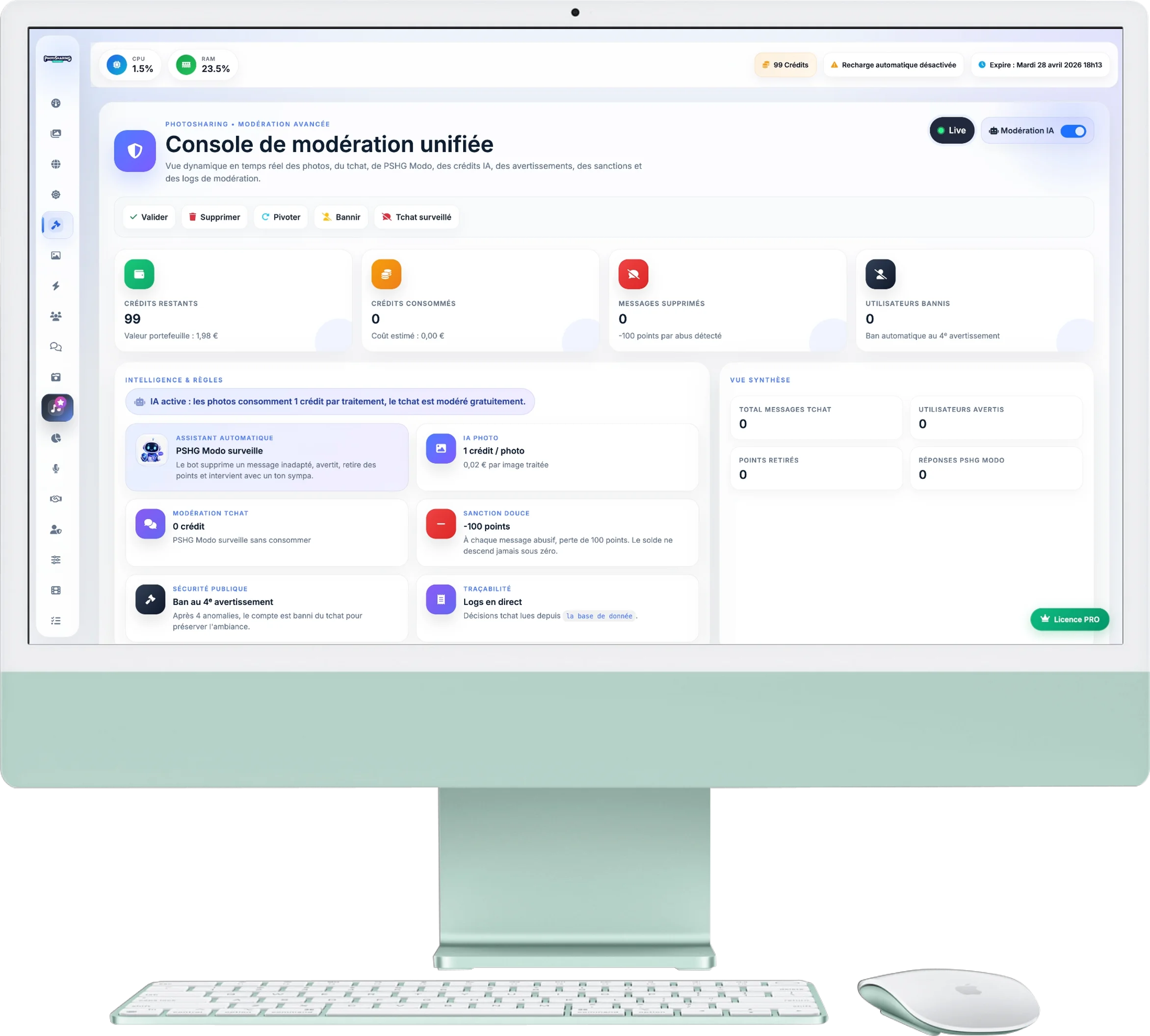
Unified Moderation Console
Maintain total control over your event! This premium menu allows you to monitor all photos and chat messages in real time, apply AI filters and ban unwanted elements.
1. AI Moderation and Credit Tracking
The top panel is your smart security dashboard:
- AI Activation: A switch on the right allows you to activate or deactivate automatic moderation by Artificial Intelligence at any time.
- Pricing and Usage: The AI consumes 1 credit per photo analyzed (i.e. €0.02).
- Live Wallet: Monitor your remaining credits and the number of images already processed. If you drop to zero, AI moderation automatically stops to avoid unpleasant surprises.
2. The Main Flow (Photos)
On the left, all the photos sent by your guests are displayed automatically (without needing to refresh the page):
- Auto Update: New images appear live.
- Quick actions (on hover): Hover your mouse over a photo to see the action buttons appear. You can Confirm (green), Delete (red), Rotate (blue) or Ban the user (yellow).
3. Chat Monitoring
The right column is dedicated to messages sent on the interactive wall:
- As with photos, the feed is constantly updated.
- If a message is inappropriate, use the button Delete to instantly erase it from the giant screen.
- In the event of a recurrence, the button Ban permanently blocks the user.