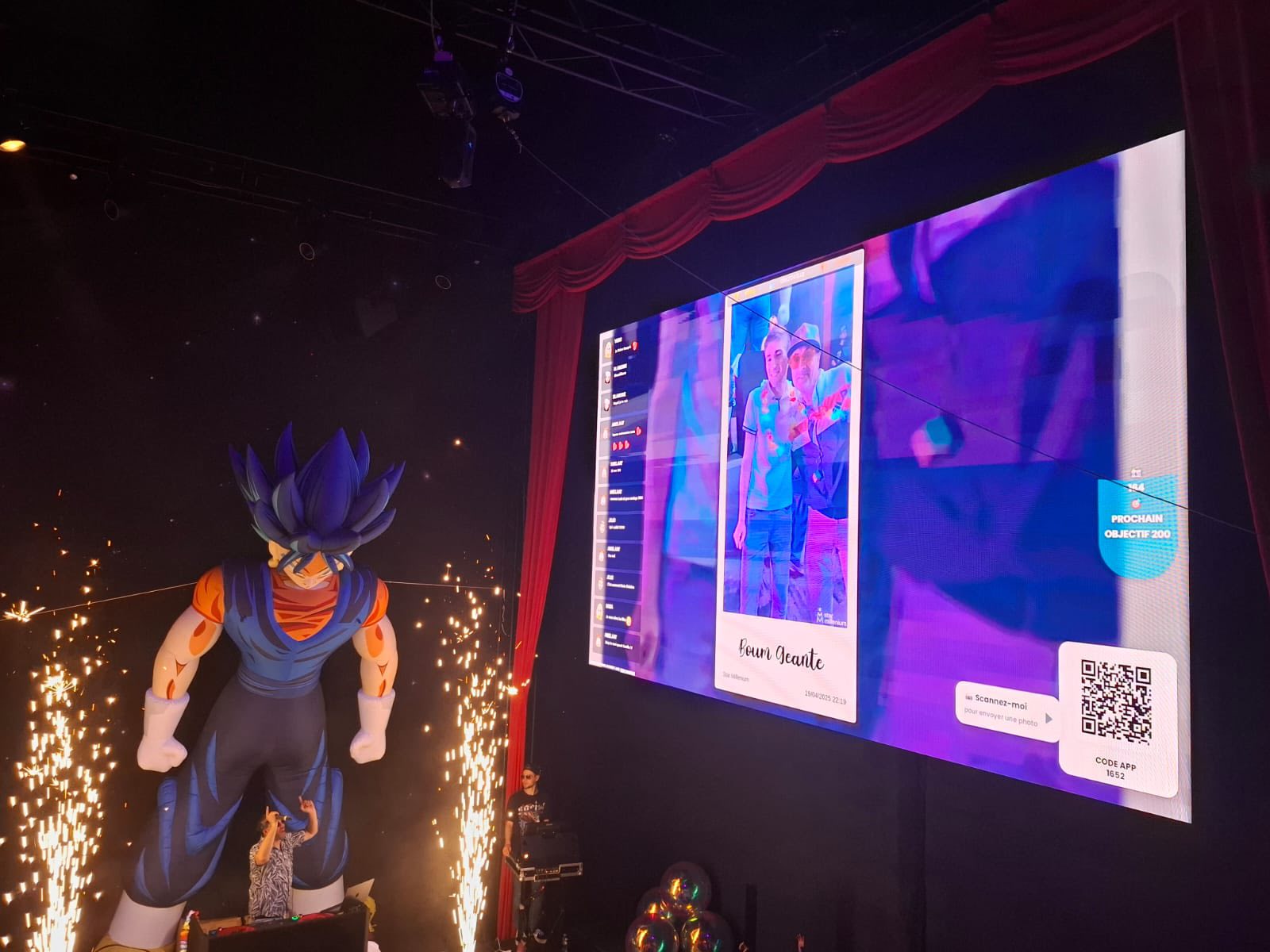
A large event screen displaying a guest photo and a QR code captures the central idea: let people contribute from their phones and bring the screen to life. PhotoSharing can be an alternative to Clickty when browser access, organiser controls and a reusable event gallery matter to you.
If you are looking for an alternative to Clickty, PhotoSharing is worth considering when you want guests to join through a QR code and their browser, without downloading an application. Photos, videos, GIFs and messages can then appear on a TV, projector or large event screen, while the organiser retains control through a dedicated dashboard.
The experience is easy to understand when seen on a stage: a screen shows a contributed photo beside a QR code and a clear invitation to scan. Guests immediately know what to do, and each contribution helps the display become part of the entertainment rather than a slideshow watched passively. This browser-first approach can suit weddings, birthdays, private parties, corporate events and public-facing formats.
Want to test the guest journey before deciding? PhotoSharing provides a free 0 EUR demo without a payment method. An isolated test instance is generally delivered within 1 to 2 minutes.
Clickty or PhotoSharing: two approaches to event participation
Clickty and PhotoSharing address a similar need: collecting event photos and enjoying them through a live slideshow. Clickty’s public presentation describes an application for planning events, inviting participants, posting photos in a dedicated secured feed and launching a connected live slideshow. It is presented as available on Android and iOS.
PhotoSharing takes a different route to the same participatory result. The organiser displays a QR code or shares a link, and guests open the event directly in their mobile browser. There is no application to download. Depending on the enabled modules, they can contribute photos, videos, GIFs or messages and see validated content appear on the event screen.
Neither route is universally right for every audience. An app-centred experience may fit a group already comfortable joining and using a dedicated application. A browser-based experience can be preferable when you want to reduce the number of steps between seeing the QR code and sending the first photo.
From QR code to live event screen
The large screen visible in the hero image illustrates the practical outcome rather than a specific type of event: a submitted portrait is displayed alongside a QR code while stage activity continues around it. The photo wall becomes part of the atmosphere and gives the audience an obvious way to participate.
How PhotoSharing works in four steps
- Prepare the event space. The organiser opens the PhotoSharing dashboard, configures the required modules and launches the slideshow on a TV, projector or large screen.
- Display the QR code. Guests scan it with their smartphones. A link can also be shared, and guest access remains configurable according to the event settings.
- Receive contributions. Participants capture a new photo or select one from their gallery. Videos, GIFs, messages, comments and reactions are available according to the formula and configuration.
- Animate and recover the memories. Approved media joins the slideshow and gallery. After the event, the organiser can recover content, including original HD files, the complete gallery, an online album or a souvenir video according to the selected formula and configuration.
The organiser is not limited to watching the slideshow. The dashboard can be used to enable or disable modules, monitor participation, review received media, rotate or delete content and moderate items before public display. For a closer look at the screen experience, visit the live photo wall guide.
How to choose
A useful comparison should start with your guests, your venue and the level of control you need—not with a long feature checklist. Use the following criteria to assess Clickty, PhotoSharing or another event photo-sharing service.
1. How quickly can guests participate?
Count every action required before someone can send a photo. Consider scanning or entering a code, downloading an app, creating an account and learning a new interface. PhotoSharing opens in the browser through a QR code or link and does not require an app. Account and guest access can be adjusted through the organiser’s settings.
2. What role should the screen play?
Decide whether you need a straightforward live slideshow or a broader interactive display. PhotoSharing can show contributed media while also supporting chat, reactions, comments, points, rankings and visual animations when the relevant modules are active. The aim is to turn the screen into a shared point of attention without distracting guests from the event itself.
3. Do you need approval before publication?
For a small private gathering, direct display may be acceptable. For a corporate event, festival, association or screen visible to the public, reviewing content can be essential. PhotoSharing provides organiser controls and manual or intelligent moderation options, depending on the formula and configuration. Users can also be managed or blocked when necessary.
4. What should happen after the event?
A live slideshow solves the immediate entertainment need, but the submitted files may also need a useful destination. PhotoSharing centralises them in a gallery and can provide a dedicated online album. Its visibility can be chosen by the organiser: public or password-protected, shared by link or QR code, with individual or complete-album downloads according to the configuration.
5. Is this a one-off or recurring requirement?
A wedding or birthday usually needs one active event and a clear way to recover the memories. An agency, venue, company or regular organiser may instead need to reset the same instance between several events. Frequency also affects whether brand customisation, collaborators, statistics and stronger moderation are relevant.
6. Will the venue network support live uploads?
Test in realistic conditions whenever possible. A busy venue Wi-Fi network can affect uploads, particularly for large photos and videos. Keep the slideshow in a dedicated full-screen tab, verify the QR code from several phones and check whether Wi-Fi or mobile data offers the more stable connection.
Practical tip: run the complete journey before the event. Display the QR code, scan it as a guest, send several photos, approve one through the dashboard and confirm that it appears on the intended screen. The free demo lets you test this workflow without entering payment details. More setup guidance is available in the PhotoSharing help centre.
Which PhotoSharing formula fits your event?
PhotoSharing’s 2026 offer separates a one-off private event from recurring and professional uses. Choose according to the number of events and the controls you actually need.
Private Event: one wedding or birthday
The Private Event formula costs 20 EUR as a one-time payment. It covers live photos, videos and GIFs, a large-screen slideshow and QR code, interactions, chat and ranking. It also includes recovery of original HD files, an online album and a souvenir video. This is the most direct match for a single personal celebration.
Standard: recurring events
The Standard formula costs 19.80 EUR per month. It is intended for keeping an instance active and resetting it between several events. It includes unlimited guest connections and submissions, a complete dashboard and modules that can be activated as needed. The instance can be reset while the subscription remains active.
Pro: branding, moderation and teamwork
The Pro formula costs 39.60 EUR per month. It is designed for organisers who need customised branding, moderation and collaboration. It includes a personalised logo, background and copyright, manual moderation, reinforced registration, 30-day statistics with AI, collaborators, an extended album and a secure SSL subdomain. Karaoke, DJ requests and advertising video are also included for relevant event formats.
You can review the available options on the PhotoSharing plans page. Some functions depend on credits or the selected configuration, so confirm your required modules before activation.
Three practical differences to consider
A no-download guest journey
PhotoSharing’s main distinction is immediate browser access. A guest sees the QR code, scans it and reaches the event space without installing an application. This can be useful for mixed audiences, short events or large rooms where the organiser wants participation to begin with minimal explanation.
Organiser control before the screen changes
The dashboard gives the organiser a central place to manage modules, media and display settings. Photos can be validated, removed or rotated, and moderation can be applied before publication. This matters when the live screen is highly visible, as in the staged setting shown above, where every displayed image becomes part of the wider production.
A dedicated destination for the collected media
The live screen is only one part of the journey. A dedicated album can preserve the shared contributions after the display is switched off. The organiser chooses its visibility and can share it by link or QR code, making it easier to move from live participation to a controlled collection of event memories.
Suitable contexts for a browser-based photo wall
- Weddings and birthdays: guests contribute spontaneous photos and messages while the organiser builds a collaborative gallery for after the celebration.
- Parties and staged entertainment: a projected QR code and live photos can complement visual effects, music and other on-screen animations without defining or interrupting the main show.
- Corporate and public events: branding and moderation can provide greater control over what appears on a shared display, according to the selected formula and settings.
If your priority is specifically collecting images through a scannable code, the QR code photo upload guide explains that use in more detail.
A Clickty alternative you can test without pressure
Clickty may suit organisers looking for an app-centred event feed and connected slideshow. PhotoSharing can be an alternative when you prefer browser access through a QR code, direct organiser controls and an album that continues the experience after the live display.
The simplest way to decide is to reproduce your real setup. Create the 0 EUR demo without a payment method, open the slideshow on the screen you plan to use and invite a few people to submit test photos. If you need help selecting a formula or preparing a public display, contact PhotoSharing with the event format and your moderation requirements.
Next step: test the QR code, guest upload, moderation and live screen in one complete rehearsal.
Frequently asked questions
Is PhotoSharing the same as Clickty?
No. The services overlap around event photo sharing and live slideshows, but their participation routes differ. Clickty’s public positioning is centred on its mobile application, while PhotoSharing lets guests join through a QR code or link in their browser without downloading an app.
Do guests need an account or application?
No application is required. Guests access PhotoSharing from a smartphone browser. The precise joining process, including guest mode and access verification, can be configured by the organiser.
Can photos be moderated before appearing on the big screen?
Yes. PhotoSharing provides dashboard controls and supports moderation before display. Manual or intelligent moderation, user management and reinforced registration depend on the formula and configuration.
Can I try this Clickty alternative before paying?
Yes. PhotoSharing offers a free 0 EUR demo without a payment method. An isolated instance is generally prepared within 1 to 2 minutes so you can test the dashboard, QR code, guest uploads, gallery and slideshow.
FAQ
Is PhotoSharing the same as Clickty?
No. Both address event photo sharing and live slideshows, but Clickty’s public positioning is app-centred. PhotoSharing lets guests join through a QR code or link in their browser without downloading an application.
Do guests need an account or application?
No application is required. Guests access PhotoSharing from a smartphone browser, while guest mode and access verification can be configured by the organiser.
Can photos be moderated before appearing on the big screen?
Yes. PhotoSharing provides organiser controls and supports moderation before display. Manual or intelligent moderation, user management and reinforced registration depend on the formula and configuration.
Can I try this Clickty alternative before paying?
Yes. PhotoSharing offers a free 0 EUR demo without a payment method. An isolated instance is generally prepared within 1 to 2 minutes for testing the QR code, uploads, dashboard, gallery and slideshow.
Create an event
Un QR Code, des invités qui participent, et un diaporama qui donne vie à votre événement en direct.