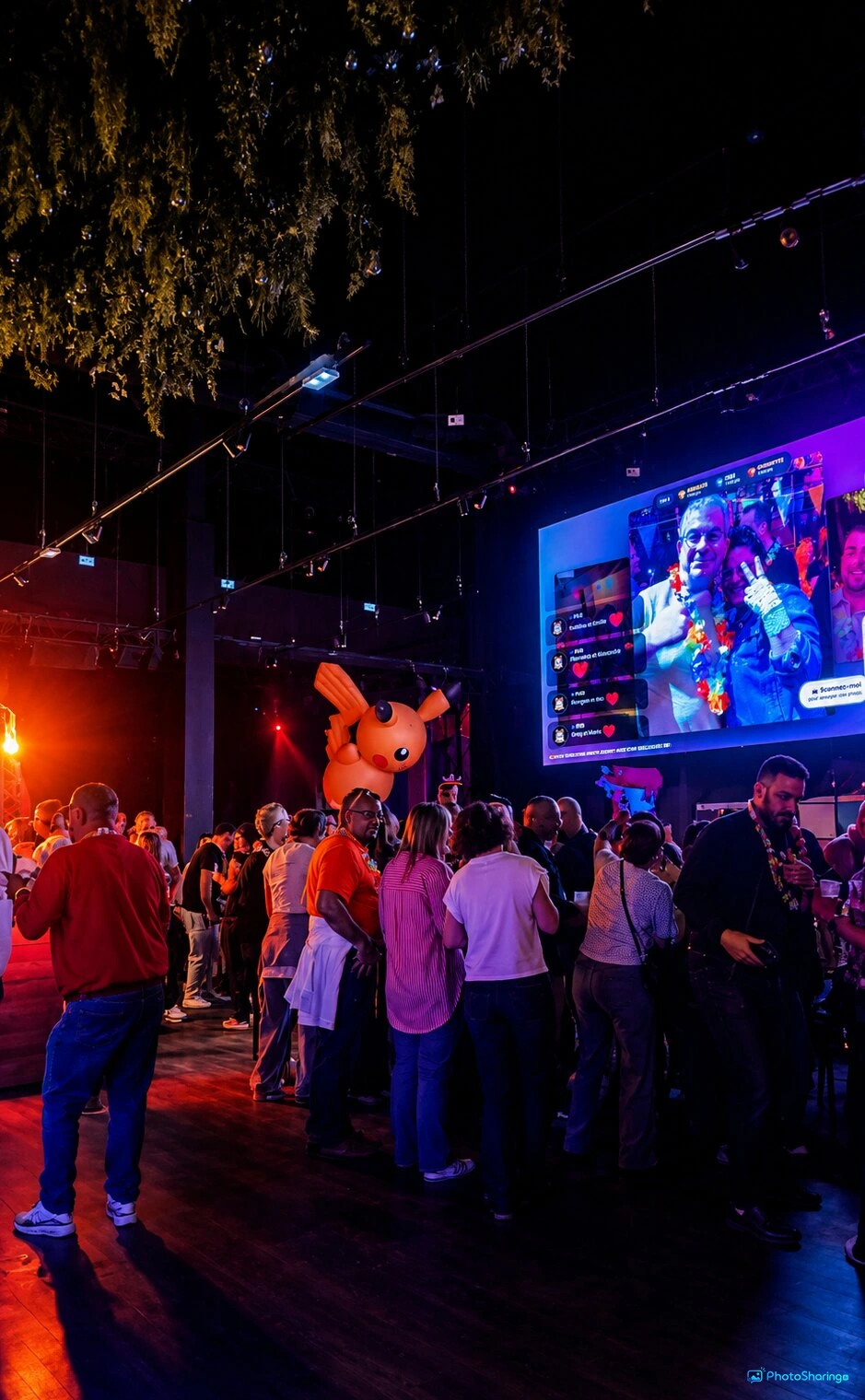
Turn your events into interactive experiences with the live photo wall by PhotoSharing.fr. Guests upload photos via QR code and see them instantly displayed on big screens without any app downloads.
What is a Live Photo Wall?
A live photo wall is an engaging digital display that brings your event guests' photos, videos, GIFs, and messages to life in real-time. Powered by PhotoSharing.fr, it transforms any screen—whether a TV, projector, or large display—into a dynamic showcase where attendees can share memories instantly via their smartphones.
How PhotoSharing.fr Enhances Your Event with a Live Photo Wall
PhotoSharing.fr provides an all-in-one platform to create a live photo wall that is simple for guests and powerful for organizers. Here’s how it works:
- Easy Access via QR Code: Guests scan a unique QR code on their phones—no app download required—and can immediately upload photos, videos, GIFs, or send messages.
- Real-Time Display: All uploaded content appears instantly on a large screen, creating a vibrant, collective experience.
- Interactive Features: Guests can react with comments, chat, send Wizz (animated icons), and participate in fun challenges with point scoring and rankings.
- Moderation & Control: Organizers maintain control over content with options to moderate and validate uploads before displaying them.
- Personalization: Brand your event with logos, backgrounds, and customized design for a unique touch.
Interactive Entertainment Modules to Engage Your Guests
PhotoSharing.fr goes beyond simple photo sharing by integrating animations and interactive games that enhance guest participation:
- Jukebox & DJ Requests: Attendees suggest songs, creating a crowd-curated playlist.
- Karaoke & Blind Test: Fun musical games to keep energy high.
- Photo Booth Mode: Turn any tablet into a photobooth that captures multi-shot animations and boomerangs with live AI filters.
- Challenges & Rankings: Guests can earn points by contributing content and take part in contests displayed on the live wall.
Setup Made Simple: From Tablet to Giant Screen
Launching your live photo wall event is straightforward:
- Display Screen Setup: Connect your TV or projector to your event computer.
- Create Your Event Instance: Use PhotoSharing.fr’s platform to generate your unique QR code and configure moderation settings.
- Tablet Photobooth: Place a tablet running PhotoSharing.fr as a self-service photo booth for guests to capture snapshots autonomously.
- Share the QR Code: Guests scan the code with their phones to start sharing instantly.
- Manage & Moderate: Use the dashboard to control content flow, activate modules, and monitor participation metrics in real time.
Advantages of Using PhotoSharing.fr Live Photo Wall
- No App Download Needed: Simple, barrier-free participation increases guest engagement.
- Unlimited Photo Uploads & Connections: Even large events can run smoothly without connection or content limits.
- Centralized Gallery and Album: All event media is safely stored and easily accessible for sharing after the event.
- French Support & User-Friendly Interface: Receive dedicated assistance and enjoy an intuitive experience as host or guest.
Tip: Ensure your Wi-Fi network is stable and has good coverage to support seamless real-time uploads and smooth live display during your event.
Step-by-Step Guide to Host Your Live Photo Wall Event
- Sign Up & Create Your Event: Register on PhotoSharing.fr and prepare your event page and QR code.
- Set Up Your Display: Position your screen and ensure it’s connected to the internet and your computer for the slideshow.
- Configure Event Settings: Enable desired modules such as chat, points, and animations; personalize branding.
- Invite Your Guests: Share the QR code prominently for guests to scan.
- Engage & Monitor: Watch your guests contribute content live; manage moderation and interaction levels.
- Download Gallery: After the event, download a complete photo album and share memories with attendees.
Frequently Asked Questions
Do guests need to install an application to join the photo wall?
No application installation is necessary. Guests only need to scan a QR code and use their smartphone browser to participate instantly.
Can the organizer moderate photos before they appear on the live wall?
Yes, organizers have full control to manually or automatically moderate content before it is displayed, ensuring appropriate and quality uploads.
Is there a limit to the number of photos or guests for an event?
PhotoSharing.fr supports unlimited photo uploads and guest connections, making it suitable for events of any size without restrictions.
How can I personalize the live photo wall to reflect my event’s branding?
With the PRO license, you can customize the logo, background, copyrights, and social media links to truly make the photo wall your own.
Conclusion & Call to Action
PhotoSharing.fr’s live photo wall technology turns your event into a memorable and interactive celebration. Easy for guests, powerful for organizers, it enhances connection, engagement, and fun in any setting. Start your free trial today and transform your next event into an unforgettable experience!
Discover the Live Photo Wall and choose your subscription now.
FAQ
Is a mobile app required to use the PhotoSharing live photo wall?
No mobile app is required. Guests participate directly via their smartphone browser using a QR code, so no downloads are necessary.
Can I moderate the photos before they appear on the live photo wall?
Yes, organizers can enable manual or intelligent moderation to review and validate photos, videos, and messages before they are broadcasted.
Are there limits on how many guests can join or how many photos can be uploaded?
No, PhotoSharing.fr allows unlimited guests and photo uploads during your event, ensuring smooth participation regardless of event size.
How can I customize the live photo wall for my event?
With the PRO license, you can personalize the photo wall by adding your logo, customized background, copyrights, and social media links to match your event branding.
Create an event
Un QR Code, des invités qui participent, et un diaporama qui donne vie à votre événement en direct.