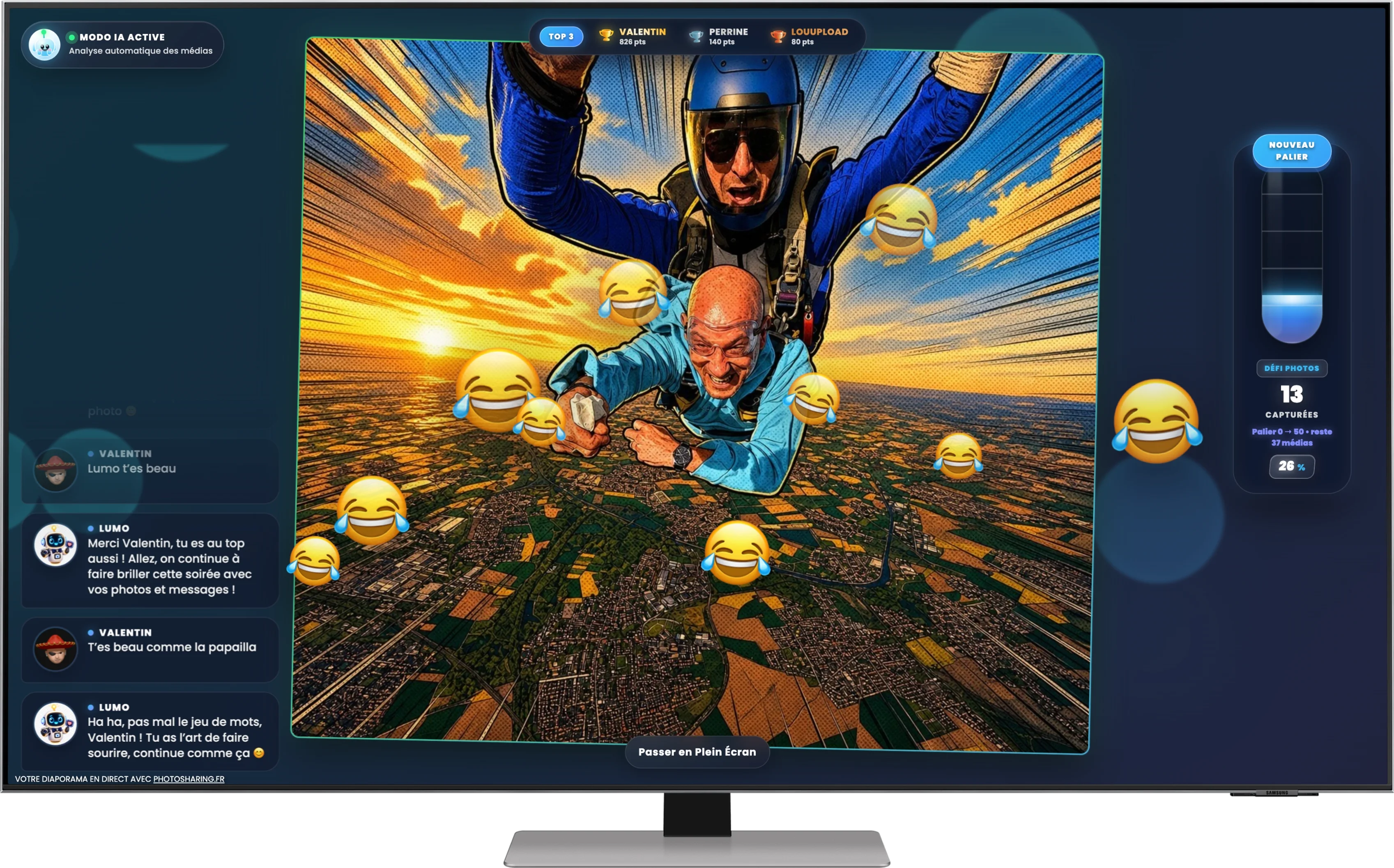
Turn your events into dynamic, interactive experiences with PhotoSharing.fr’s live slideshow. Let guests share photos instantly via QR code without any app downloads.
Introduction to Live Slideshows for Events
In today’s digital age, keeping your guests engaged during any event — be it a wedding, corporate gathering, or private party — requires more than just good music and food. PhotoSharing.fr offers a unique live slideshow experience for events that brings everyone into the moment through interactive photo sharing.
How PhotoSharing.fr Revolutionizes Event Photo Sharing
PhotoSharing.fr transforms your TV, projector, or giant screen into a live animation hub where all guests can participate instantly. Using a simple QR code, attendees upload photos, videos, GIFs, and messages live — no app installation required.
Key Features
- QR Code Access: Guests scan a code to join instantly from their smartphone browser.
- Live Diaporama: Photos and content display in real time on a large screen, creating a vibrant atmosphere.
- Interactive Elements: Chat, reactions, points, rankings, Wizz effects, and more engage guests actively.
- Animations & Games: Jukebox requests, karaoke, blind tests, and photo booth modes add layers of fun.
- Tablet Photobooth: Turn a tablet into a self-serve photo booth with four-shot animations and AI filters.
- Moderator Control: Organizers can validate and moderate content through a comprehensive dashboard.
- Personalization PRO: Customize branding with logos, backgrounds, and social media links.
- Centralized Gallery: All media collected is stored in an accessible, shareable online album after the event.
Benefits of Using a Live Slideshow at Your Event
- Simple and Convenient: Guests can participate easily without downloading anything.
- Enhances Guest Engagement: Interaction via chat, points, and live reactions fosters a lively environment.
- Creates Lasting Memories: A collective album captures the event from multiple perspectives.
- Flexible Use Cases: Suitable for weddings, birthdays, corporate events, and private parties.
- Instantaneous Participation: Real-time sharing generates excitement and inclusion.
Setting Up Your Live Slideshow with PhotoSharing.fr
Launching a live slideshow is straightforward. Here’s how to set up your event animation:
- Create a Free Instance: Start your event on PhotoSharing.fr with a no-cost demo to explore the features.
- Share the QR Code: Display it prominently at your venue for guests to scan.
- Manage via Dashboard: Use the organizer dashboard on your computer to activate modules, moderate content, and control animations.
- Engage and Animate: Turn on interactive games, jukebox, or karaoke modes to keep guests entertained.
- Save and Share Memories: After the event, download or share the gallery of photos and videos with attendees.
Tablet Photobooth: A Self-Serve Photo Experience
Complement your live slideshow with a tablet turned into an autonomous photobooth. Guests take selfies or series of photos with fun filters and animations that can instantly join the live slideshow and gallery. It’s ideal for entrances, cocktail hours, or the dance floor.
Expert Tips to Maximize Your Event’s Photo Sharing
Frequently Asked Questions
Do guests need to download an app to join the slideshow?
No, participation is app-free. Guests scan a QR code and upload content through their web browser.
Can I moderate photos and videos before they appear on the big screen?
Yes, organizers can enable manual or AI-powered moderation directly from the dashboard.
Is there a limit to the number of photos guests can upload?
PhotoSharing.fr supports unlimited photo uploads during an active event session.
What types of events are suitable for PhotoSharing.fr live slideshows?
It works perfectly for weddings, birthdays, corporate events, private parties, and virtually any gathering requiring interactive photo sharing.
Get Started with PhotoSharing.fr Today
Bring an unforgettable interactive photo experience to your next event. Click below to create your free event instance and explore how a live slideshow can engage your guests and capture vibrant memories effortlessly.
FAQ
How do guests participate in the live slideshow?
Guests scan a QR code at your event, then upload photos, videos, GIFs, or messages directly from their smartphone browser without needing to download an app.
Can I control and moderate what appears on the live slideshow?
Yes, the organizer dashboard provides tools to moderate content manually or automatically before it appears on the main screen.
Is there a limit to the number of guests or photos that can participate?
No, PhotoSharing.fr supports unlimited guests and photo uploads during an active event instance, ensuring smooth participation even in large venues.
What additional interactive features are available besides photo uploads?
You can activate interactive modules like chat, reactions, points, rankings, jukebox music requests, karaoke sessions, blind tests, and photo booth animations to enrich guest engagement.
Create an event
Un QR Code, des invités qui participent, et un diaporama qui donne vie à votre événement en direct.