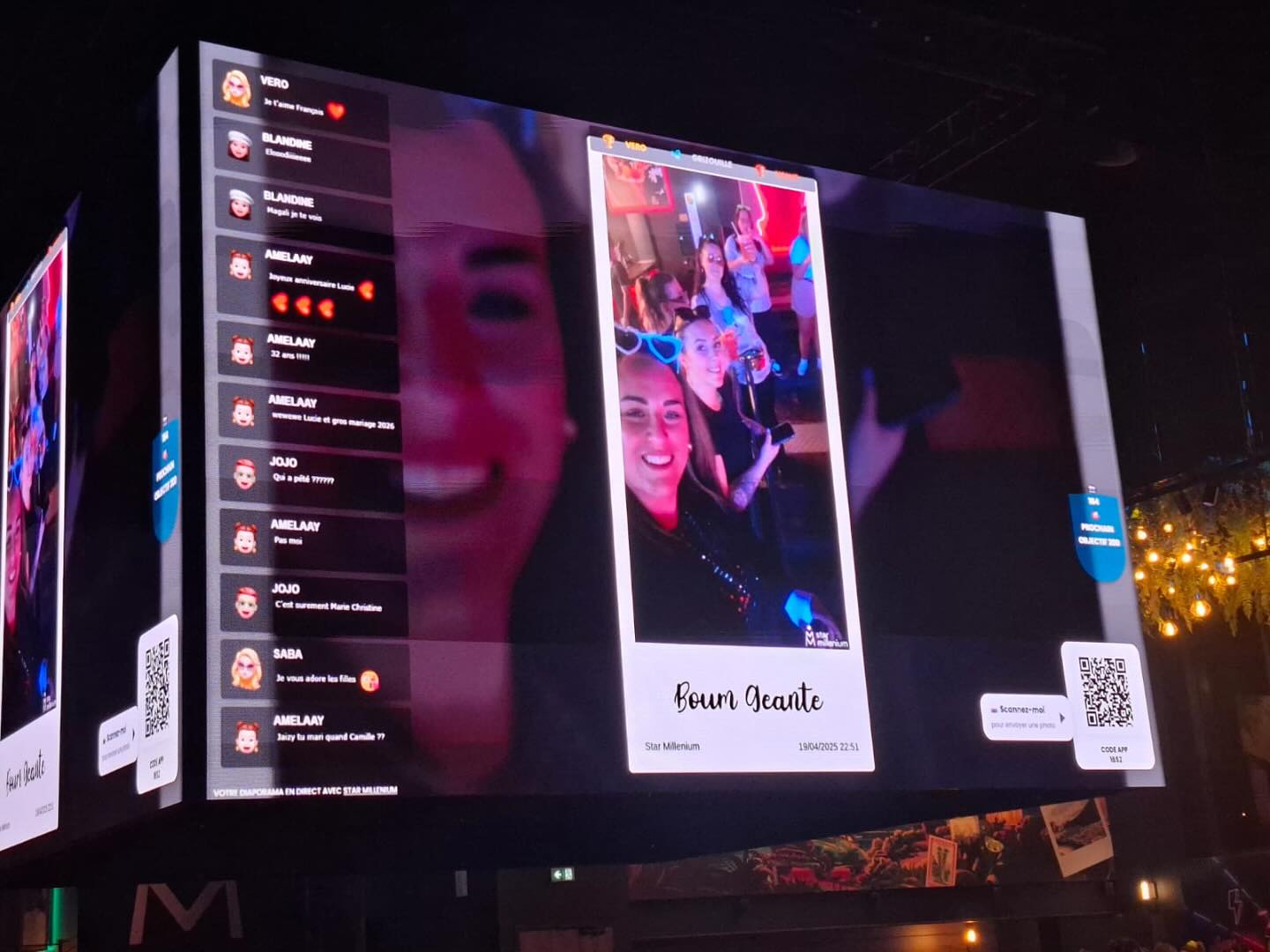
The live-screen experience shown here—guest photos, comments and QR codes on a giant display—is the core use case behind this comparison. PhotoSharing can be a PhotoLiveShow alternative when you want QR-based participation plus organizer controls, interactions and an online gallery.
PhotoSharing can be a relevant PhotoLiveShow alternative if you want guests to contribute through a QR code while giving the organizer control over what appears on the event screen. Both approaches address a simple problem: guests take plenty of photos, but those moments often remain scattered across individual phones. A collaborative live display brings them into the room while the event is still happening.
The experience is easy to picture: a giant screen shows a festive group photo, a stream of comments and QR codes that invite other guests to participate. PhotoSharing builds on this central use case with live photos, videos, GIFs and messages, plus moderation, interactive modules and a dedicated online album according to the selected plan and configuration.
What a live photo screen should achieve
A successful live slideshow is not simply a folder of images projected on a wall. It should make participation obvious, keep the display moving and leave the organizer with useful memories after the event. Guests need to understand what to do without a lengthy explanation: scan the code, open the event page, choose or capture a photo and send it.
The result should also work at room scale. On a TV, projector or giant screen, new contributions create a shared focal point. Photos can trigger conversations, while comments and reactions make the display feel connected to the people in the venue rather than like a slideshow prepared in advance.
PhotoLiveShow and PhotoSharing: two valid approaches
According to its public presentation, PhotoLiveShow focuses on photo sharing through a QR code, guest access without an application or account, immediate projection and an event album. That can suit organizers looking primarily for a straightforward collaborative photo slideshow.
PhotoSharing starts from the same accessible QR-code principle but offers a broader participatory environment. Guests use their browser without downloading an app and can send photos, videos, GIFs or messages. The organizer can manage the experience from a dashboard, control modules and moderate contributions before they reach a public screen.
Neither approach needs to be presented as universally preferable. The useful question is how much control, interaction and post-event organization your specific event requires.
How to choose between PhotoLiveShow and an alternative
1. Measure participation friction
Every extra step reduces the chance that a guest will contribute. Prioritize a QR code that opens a mobile-friendly page and does not require an application download. With PhotoSharing, access can be configured by QR code or link, and guest mode can be adjusted by the organizer. Test the exact journey you plan to use rather than relying only on a feature list.
2. Decide whether you need a slideshow or an animation
A simple slideshow may be sufficient when the goal is to collect and display photos. For a birthday party, DJ evening or other lively gathering, comments, reactions, Wizz effects, points and rankings can encourage repeat participation. These modules are optional, so the screen does not have to become overly busy.
3. Consider moderation before using a public screen
A photo sent from a phone can quickly become visible to the entire room. For a wedding, corporate event or public venue, decide whether contributions should appear immediately or require validation. PhotoSharing allows the organizer to validate, delete, rotate or moderate content before display, depending on the plan and configuration.
4. Plan what happens to the photos afterwards
The screen is temporary, but the collection may remain valuable. Check whether you can recover original files, download everything together and control album visibility. With PhotoSharing, the dedicated online album can be public or protected by a password, shared through a link or QR code, and configured for individual or complete downloads.
5. Match the service to your event frequency
A one-off family celebration does not have the same needs as monthly events or branded corporate activations. Consider whether you need one event, an instance that can be reset between events, or advanced identity, moderation and collaboration controls. This distinction is more useful than comparing isolated features.
From QR code to live screen in four steps
- Display the access point. Put the event QR code where guests can see it and keep it visible on the slideshow when appropriate. A link can provide an additional access route.
- Let guests contribute. Participants open the page in their mobile browser, capture a photo or choose one from their gallery, then send it. Videos, GIFs and messages can also be available according to the configuration.
- Bring the screen to life. Approved contributions join the live display on a TV, projector or giant screen. Comments, chat, reactions or other animations can add a collective layer when enabled.
- Recover the memories. After the event, the organizer can manage the gallery and retrieve the available media. Original HD files, the complete gallery, an online album and a souvenir video are available according to the plan and configuration.
This journey reflects the experience suggested by the hero image: QR codes invite contributions, a guest photo becomes the focal point and live comments connect the screen with the room.
Three PhotoSharing strengths worth evaluating
Organizer control and moderation
The dashboard provides a central place to activate or deactivate modules, monitor participation and manage received content. Manual or intelligent moderation can help prevent an unsuitable image or message from appearing on a large public screen. This is particularly relevant for corporate events, mixed audiences and venues where the display remains highly visible.
Interaction beyond a standard slideshow
PhotoSharing can combine the live slideshow with comments, chat, reactions, Wizz effects, points, challenges and rankings. In party or DJ settings, optional modules can also include a collaborative jukebox, song requests, karaoke or a blind test. Availability depends on the plan and configuration, allowing organizers to keep only the interactions that support their format.
A dedicated album with adjustable visibility
The online album extends the experience after the screen is switched off. It can be personalized for a wedding, birthday or company event, shared by link or QR code and made public or password-protected. The organizer chooses the visibility and available download options.
Practical advice
Do not activate every module simply because it exists. Start with QR access, photo upload, the live screen and moderation. Add comments, games or music features only when they serve the atmosphere you want to create.
Which PhotoSharing plan fits your use case?
Based on the PhotoSharing prices communicated on 10 July 2026, the plans correspond to three distinct patterns. Some options may depend on credits or configuration.
- Private Event — €20, one-time payment. Intended for a single wedding or birthday. It includes live photos, videos and GIFs, the large-screen slideshow and QR code, interactions, chat and ranking, recovery of HD originals, an online album and a souvenir video.
- Standard — €19.80 per month. Designed for recurring events. The instance stays active and can be reset between events, with unlimited guest connections and uploads, a full dashboard and modules that can be activated as needed.
- Pro — €39.60 per month. Intended for brand identity, moderation and collaboration requirements. It includes custom logo, background and copyright, manual moderation, strengthened registration, 30-day statistics with AI, selected entertainment modules, advertising video, SSL subdomain, collaborators and an extended album.
For a detailed review before deciding, compare the PhotoSharing plans. Organizations with unusual volumes, public screens or specific infrastructure can also contact PhotoSharing to discuss their setup.
A simple checklist before the event
- Open the slideshow in a dedicated full-screen browser tab on the display device.
- Test the venue network and keep a mobile connection available if the Wi-Fi becomes saturated.
- Scan the QR code from more than one phone and submit several test images.
- Confirm whether uploads appear directly or require moderation.
- Choose the album visibility and communicate your image-use rules to guests.
- Remove test media before the real event begins.
The PhotoSharing help centre explains QR-code preparation, slideshow setup, media recovery, moderation and common connection issues.
Try the experience before committing
PhotoSharing offers a free €0 demo without a payment method. A separate test instance is normally prepared automatically in one to two minutes, allowing you to explore the dashboard, QR code, guest upload journey, slideshow and settings. Because the demo is temporary, its test media are removed when it expires.
Create a free PhotoSharing demo and test the complete journey on your own phone and screen. It is a practical way to decide whether this PhotoLiveShow alternative matches the level of interaction and control your event needs.
Decision FAQ
Is PhotoSharing the same service as PhotoLiveShow?
No. They are separate services that share a central use case: guests submit photos through a QR code and those photos can appear on an event screen. PhotoSharing may be suitable when you also want organizer controls, optional interactions and configurable album visibility.
Do guests need to install an application?
No application download is required for PhotoSharing guests. They open the event through a QR code or link in their mobile browser. Depending on the organizer’s access settings, guest participation can be configured with or without account creation.
Can I approve photos before they appear?
Yes. PhotoSharing provides organizer moderation and content-management options. Manual or intelligent moderation, validation and blocking are available according to the selected plan and configuration.
Can I keep the files after the event?
Yes, according to the plan and configuration. PhotoSharing can provide recoverable original HD files, a complete gallery, an online album and a souvenir video. Check the selected plan before the event to confirm which outputs are included.
FAQ
Is PhotoSharing the same service as PhotoLiveShow?
No. They are separate services with a similar QR-code live photo-sharing use case. PhotoSharing may be an alternative when you need organizer controls, optional interactions and configurable album visibility.
Do guests need to install an application?
No application download is required. Guests access PhotoSharing from their mobile browser through a QR code or link, with guest access determined by the organizer’s settings.
Can I approve photos before they appear on the screen?
Yes. PhotoSharing supports validation, deletion, blocking and moderation before public display, according to the selected plan and configuration.
Can I recover the photos after the event?
Yes. Original HD files, the complete gallery, an online album and a souvenir video can be recovered according to the plan and configuration.
Create an event
Un QR Code, des invités qui participent, et un diaporama qui donne vie à votre événement en direct.