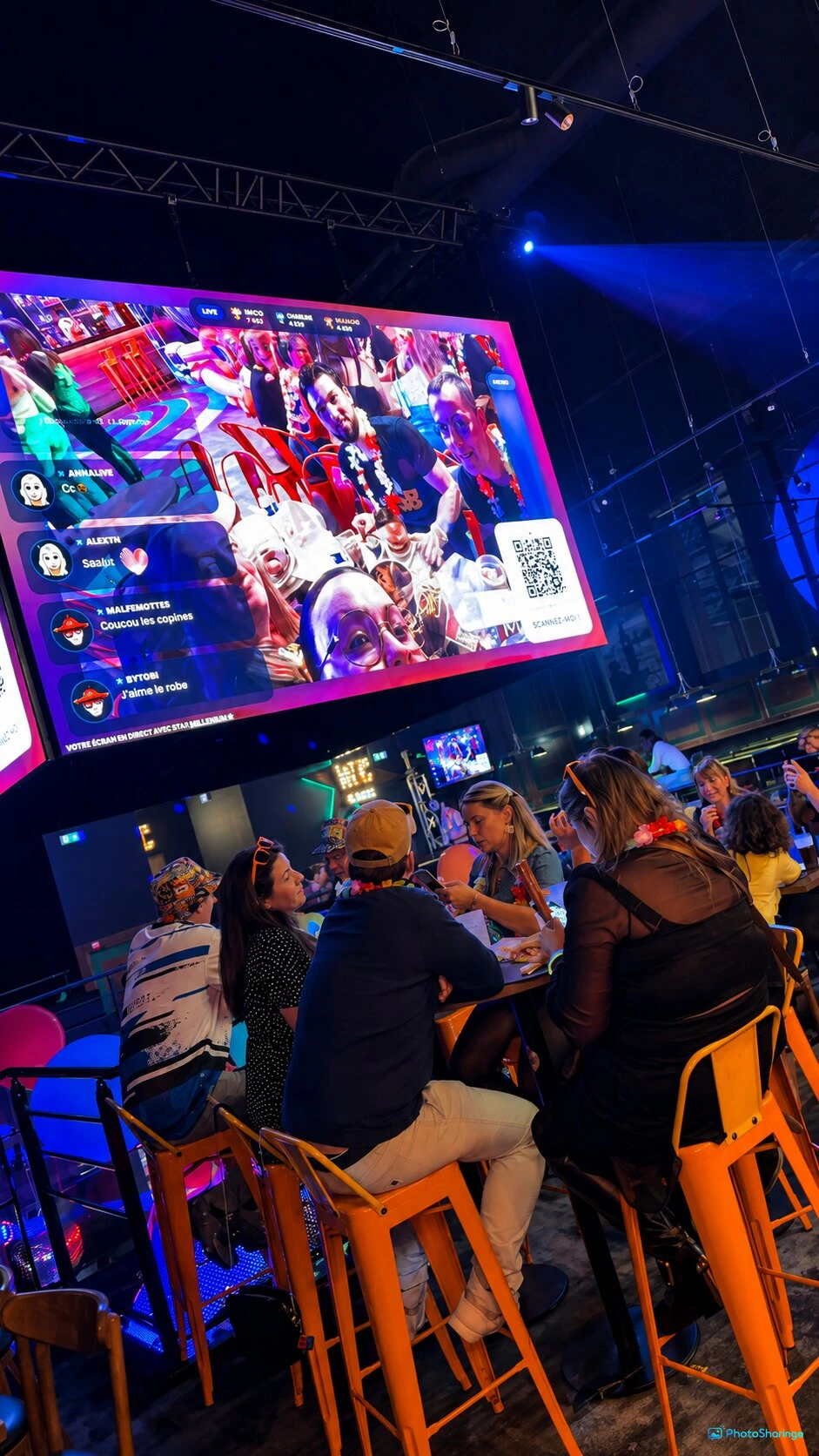
Transform your event with a virtual photo booth experience that requires no physical setup. PhotoSharing.fr lets guests join via QR code and share photos directly from their smartphones.
What Is a Photo Booth Without a Booth?
Traditional photo booths provide a dedicated physical space where guests can take fun pictures during events. However, modern technology allows you to recreate this experience without the need for a physical booth. Using just smartphones and a QR code, PhotoSharing.fr enables your guests to capture and share photos instantly, creating a lively and interactive atmosphere at any event.
How PhotoSharing.fr Simplifies Your Event Experience
With PhotoSharing.fr, your event transforms into a dynamic photo-sharing platform. Guests scan a simple QR code from their smartphones—no apps to download—then take photos, record videos, send GIFs and messages. These contributions are instantly displayed live on a big screen, bringing everyone together in real time.
Key Features Enabling the Booth-Less Photo Experience:
- Instant Access via QR Code: Guests just scan and join.
- No Downloads Required: Works directly in the browser.
- Live Diaporama: A slideshow that updates in real-time on displays like TVs or projectors.
- Interactive Animations: Points, rankings, chat, and reaction features enliven the event floor.
- Photo Booth Mode: Guests can create four-frame animations or boomerang style photos to add fun to moments.
- Moderation Tools: Organizers control content before it’s shared live.
Setting Up a Photo Booth Without a Booth
Creating an engaging photo booth experience without a physical structure is simple with PhotoSharing.fr:
- Prepare Your Event Instance: Set up your event in the PhotoSharing dashboard and customize features and moderation preferences.
- Display a QR Code: Print or project your event-specific QR code so guests can scan it immediately on arrival.
- Encourage Participation: Guests join the event space via their phones to start capturing photos or videos instantly.
- Utilize a Tablet as a Standalone Photo Booth (Optional): For a physical touch, convert a tablet into an autonomous photo booth with 4-poses animation, right at the entrance or on the dance floor.
- Showcase on Screens: Connect a large display, projector, or TV to stream contributions live, creating a communal gallery experience.
- Control the Flow: Use the organizer dashboard to moderate, validate, and manage the live stream.
Enhancing Interaction and Event Atmosphere
Beyond simple photo sharing, PhotoSharing.fr elevates guest engagement with interactive modules such as:
- Chat and Reactions: Guests comment and react live on the big screen.
- Gamification: Points, challenges, and rankings add a fun competitive edge.
- Jukebox and DJ Requests: Integrate music requests to keep the party lively.
- Karaoke and Blind Tests: Encourage group participation and entertainment.
Benefits of a Booth-Less Photo Booth
Choosing a photo booth without a physical booth offers multiple advantages:
- Cost-Effective: No need to rent or set up bulky equipment.
- Space-Saving: Perfect for venues with limited space.
- Hygienic and Touch-Free: Guests use their own smartphones, reducing shared contact points.
- Flexible and Scalable: Supports small gatherings to large crowds without extra hardware.
- High Customizability: Branding, themes, animations, and moderation tailor the experience to your event’s identity.
Step-by-Step Guide: Launching Your Photo Booth Without a Booth
- Create Your Event Account: Register and activate your PhotoSharing event instance.
- Configure Your Dashboard: Choose animation modules, moderation settings, and design elements matching your event.
- Set Up Display Equipment: Connect your TV, projector, or large screen to display the live diaporama.
- Print or Project QR Code: Make it visible for your guests at entry and throughout the venue.
- Explain Participation: Encourage guests to scan, capture moments, and interact via chat and reactions.
- Moderate and Animate: Use the dashboard to keep content appropriate and turn engagements into a memorable experience.
- Save Memories: After the event, download the entire photo gallery and enjoy a shared album.
Frequently Asked Questions
Is it necessary for guests to download an app?
No, guests simply scan a QR code and join via their browser, making participation hassle-free and immediate.
Can photos taken via smartphone appear on a large screen live?
Yes, all approved content is displayed in real time on your connected display, creating a vibrant shared moment for all attendees.
How do I moderate photos before they appear?
The organizer dashboard includes moderation tools for manual or AI-assisted review to ensure only appropriate content is shared.
Is this solution suitable for large events?
Absolutely, the platform supports unlimited guests and photo uploads, adapting to events of all sizes.
Call to Action
Ready to modernize your event with a photo booth experience that requires no physical booth? Start your free trial on PhotoSharing.fr today and transform your next gathering into an interactive celebration full of shared memories.
FAQ
Do guests need to download a special app to participate?
No, guests join the event via scanning a QR code and using their smartphone browser, without installing any apps.
How can photos be displayed live during the event?
Submitted photos and videos are shown immediately on large screens or projectors connected to PhotoSharing.fr’s platform.
Is content moderation possible before photos are displayed?
Yes, organizers can use manual or AI-driven moderation to approve or reject photos before they appear publicly.
Can this photo booth solution handle large crowds?
Yes, the platform supports unlimited guest connections and photo uploads, making it suitable for events of any scale.
Create an event
Un QR Code, des invités qui participent, et un diaporama qui donne vie à votre événement en direct.