A participatory event screen works best when guests can scan a QR code, share photos and messages, and watch the slideshow react in real time. This guide compares Clickty’s app-connected approach with PhotoSharing’s browser-based guest journey, organizer controls and online album.
If you are searching for a Clickty alternative, start with the experience you want guests to have. PhotoSharing can be an option when your priority is immediate participation through a QR Code, without asking guests to download an application. Their photos, videos, GIFs and messages can then animate a TV, projector or large screen in real time.
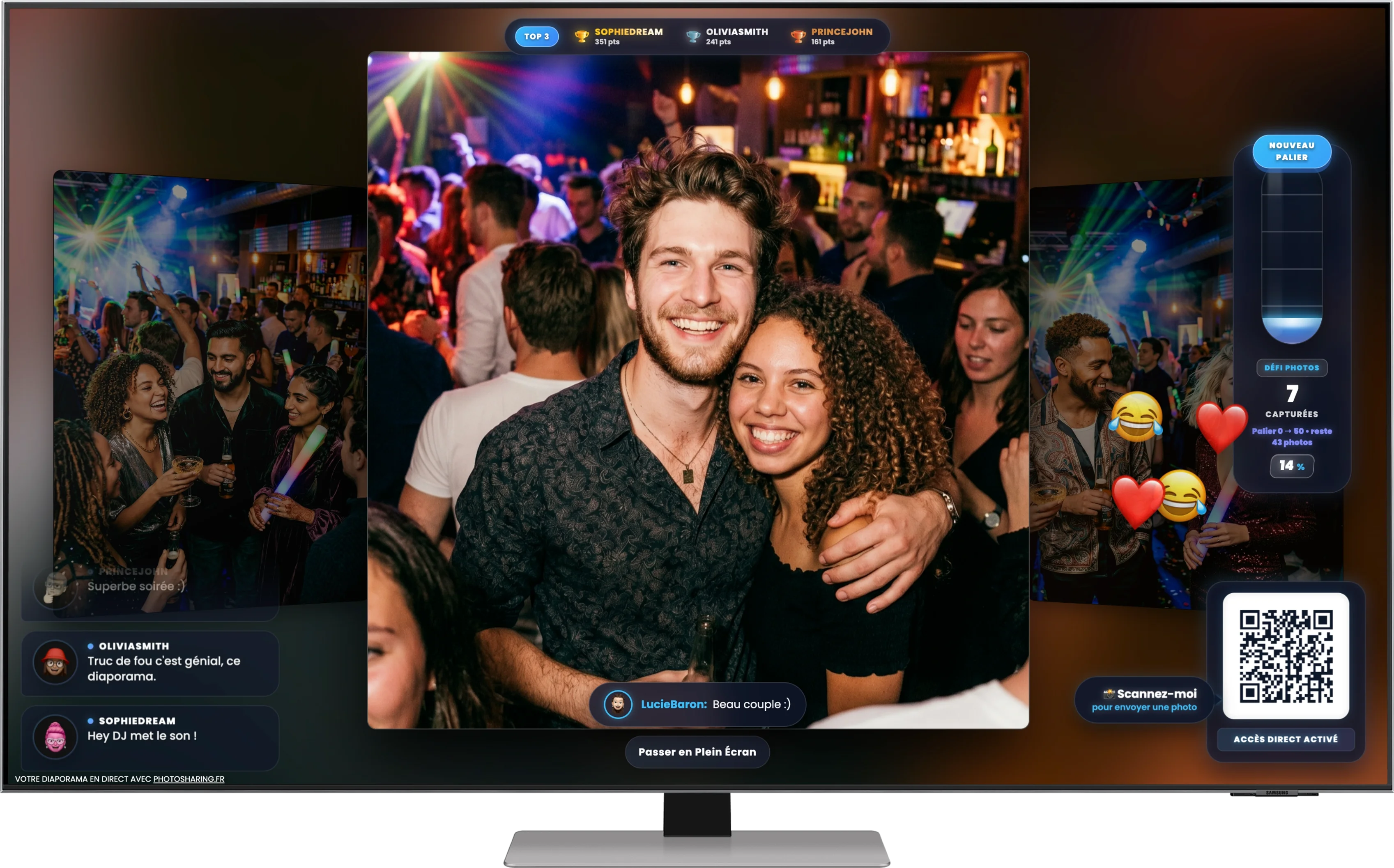
The result is the participatory experience illustrated above: a central photo surrounded by live comments, reactions, progress indicators and a ranking, with a prominent QR Code inviting more people to contribute. Clickty remains a relevant option for organizers who prefer an event experience connected to a mobile application. The right choice depends on access, screen animation, moderation, privacy and what you want to recover after the event.
Quick answer: consider PhotoSharing if you want guests to join from their mobile browser, an organizer-controlled live slideshow and a dedicated album whose visibility can be configured. Compare the full journey rather than selecting a platform from one feature alone.Why consider a Clickty alternative?
Clickty is publicly presented as an event-planning and photo-sharing application with a dedicated event feed and a live slideshow linked to the app. It is designed for occasions such as birthdays, weddings, parties, student events, venues and professional seminars.
Looking for an alternative does not mean that this approach is unsuitable. You may simply have a different practical requirement: fewer steps for guests, control over what appears on a public screen, or a gallery that can remain accessible after the event. A useful comparison therefore starts with your audience and venue, not with a generic claim that one service is universally better.
From a QR Code to a screen that feels alive
A live slideshow is more engaging when it becomes part of the event rather than a passive sequence of images. With PhotoSharing, the organizer displays a QR Code or shares a link. Guests open the event from their smartphone browser and can contribute photos, messages and, according to the configuration, videos or GIFs.
Validated content can appear on the large screen while comments, reactions, points, challenges and a Top 3 ranking encourage participation. These elements match the central use shown in the hero visual: people do not only look at a photograph; they see an interface that invites them to scan, send, react and follow the collective activity.
The organizer remains behind the controls. Modules can be enabled or disabled, and content can be validated, deleted, rotated or moderated before it is displayed. This matters at professional events, public venues and private celebrations where an unreviewed upload should not automatically become the focus of the room.
How to choose a Clickty alternative
Do not compare only the words “QR Code” or “live slideshow.” Review the complete path from the first scan to the final photo download. The following criteria reveal which approach is likely to work in real conditions.
1. Measure guest access friction
Ask whether your audience will willingly install an app or whether browser access is preferable. Clickty’s public presentation emphasizes its mobile application, while PhotoSharing lets guests join through a QR Code or link without downloading an application. PhotoSharing access can also be configured around guest mode, registration and event access settings.
2. Decide what the large screen should do
A basic slideshow may be sufficient if you only want photos to rotate. If the screen is intended to drive participation, look at comments, chat, reactions, visual effects, points and rankings. Also verify that the display can run in a dedicated full-screen browser tab on the TV, projector or computer connected to your venue screen.
3. Set your moderation level
For a small gathering, reviewing every image may be unnecessary. For a company event, club, restaurant or public-facing screen, moderation may be essential. Check whether the organizer can approve or remove content and control which modules are active. PhotoSharing provides dashboard tools for managing users, media and distribution, with moderation options depending on the formula and configuration.
4. Plan the post-event gallery
The screen is temporary, but the photographs are not. Determine whether you need original files, a complete download, an online album or a souvenir video. A PhotoSharing album can be public or protected by a password, shared through a link or QR Code, and configured by the organizer. Original HD files, the complete gallery, online album and souvenir video can be recovered according to the selected formula and configuration.
5. Match the plan to your event frequency
A one-off birthday does not require the same setup as recurring venue events or a branded corporate programme. Check whether you need one event, an instance that can be reset repeatedly, or brand identity, moderation and collaborator access.
CriterionQuestion to askPhotoSharing approachGuest entryMust participants install an app?QR Code or link opens the browser; no guest app download is required.Live displayShould the screen only show photos or encourage interaction?Slideshow, comments, reactions, points and rankings can be activated.ControlCan uploads be reviewed before appearing publicly?The dashboard provides organizer controls and moderation options.MemoriesHow will people access content afterwards?Online album and downloadable media are available according to the formula and configuration.Two event journeys, not a winner-takes-all comparison
The public Clickty journey combines event planning, invitations, a secure event photo feed and a live slideshow linked to its application. This may suit organizers and communities that want participants to use a dedicated mobile app and keep several events within that environment.
PhotoSharing follows a browser-first guest journey. It may be more suitable when the organizer wants to put a QR Code in front of the room and let people contribute without an installation step. The emphasis is on making the physical screen participatory while keeping settings, moderation and media management in the organizer’s dashboard.
Neither model should be selected in isolation. Consider the devices your guests use, the quality of the venue network, the visibility of the screen and how much control your team needs during the event.
Four steps from guest upload to shared memories
- Display the QR Code. Show it on the event screen or use the downloadable A4 poster so that it remains easy to scan. A direct link can also be shared.
- Let guests participate. They open the mobile experience in their browser, take a photo or select one from their gallery, then submit it. Videos, GIFs and messages are available according to the active configuration.
- Bring the screen to life. Approved content joins the live slideshow. Comments, chat, emojis, challenges, points or rankings can add movement and collective interaction when those modules are enabled.
- Manage and recover the event content. The organizer follows activity from the dashboard, manages media and retrieves the available originals, gallery, album or souvenir video according to the formula and configuration.
What the organizer gains
The practical outcome is a single participation point instead of photos being scattered across private messages and individual phones. Guests know where to contribute, while the screen gives them an immediate reason to do so.
From the dashboard, the organizer can activate or deactivate modules, monitor participation and manage incoming content. Moderation reduces the risk of an unsuitable image appearing on a public display. After the event, the gallery provides a clearer route to collecting and sharing the memories, subject to the selected settings and plan.
For privacy, decide before opening participation whether the final album should be public or protected by a password. Also communicate the event’s image-use rules to participants, especially when the display is public or connected to a professional event.
Which PhotoSharing plan fits the use case?
The published 2026 plans address three different event patterns. Some options may depend on credits or the chosen configuration, so review the precise setup before activation.
Private Event: one wedding, birthday or private party
20 EUR, one-time payment. This plan is intended for a single private event. It includes live photos, videos and GIFs, the large-screen slideshow and QR Code, interactions, chat and ranking, plus recovery of original HD files, an online album and a souvenir video.
Standard: recurring events
19.80 EUR per month. Standard is designed for keeping an instance active and resetting it between multiple events. It includes unlimited guest connections and uploads, the complete dashboard, modules that can be activated as needed, and resets while the instance remains active.
Pro: brand identity, moderation and collaboration
39.60 EUR per month. Pro is intended for organizers who need personalized branding and stronger control. It includes custom logo, background and copyright, manual moderation, reinforced registration, 30-day statistics with AI, SSL subdomain, collaborator access and an extended album. Other listed professional modules remain subject to the applicable configuration.
Review the PhotoSharing plans and select the event pattern that matches your needs.
Test the guest journey before committing
PhotoSharing provides a free demo at 0 EUR without a payment method. An isolated test instance is generally prepared automatically within one to two minutes. The access link and useful information arrive by email, while an SMS confirms availability.
Use the demo to open the dashboard, prepare the QR Code, send test photos from a smartphone and inspect the live slideshow, gallery, chat and moderation settings. The demo is a temporary environment, so do not treat it as storage for a real event unless the instance is activated. For setup details, visit the PhotoSharing help centre.
Create a free PhotoSharing demo and test the QR Code-to-screen journey.
Frequently asked questions
Is PhotoSharing the same as Clickty?
No. Clickty is publicly presented around an event application, a dedicated photo feed and a live slideshow. PhotoSharing gives guests browser access through a QR Code or link and focuses on the participatory screen, organizer controls and recoverable event content. Which approach fits depends on your audience and event workflow.
Do guests need to download an application?
No application download is required for PhotoSharing guests. They scan the QR Code or open the event link on their smartphone. Depending on the organizer’s access settings, they may join in guest mode or follow the configured registration process.
Can photos be moderated before appearing on screen?
Yes. The organizer can manage incoming media and use moderation before distribution. Available moderation methods and automation depend on the selected formula and configuration.
Can I test PhotoSharing before choosing a plan?
Yes. The demo costs 0 EUR and requires no payment method. An isolated test instance is generally delivered within one to two minutes, allowing you to try the dashboard, QR Code, uploads and slideshow before activation.
Turn the screen into a reason to participate
A useful Clickty alternative should solve a real event problem rather than merely reproduce a feature list. If your priority is browser-based QR access, controlled live display and an online album with configurable visibility, PhotoSharing is an option worth testing. Start with the free demo, reproduce your planned setup and decide from the actual guest and organizer experience. For a specific professional or public-event requirement, contact PhotoSharing to discuss the configuration without pressure.
FAQ
Is PhotoSharing the same as Clickty?
No. Clickty is publicly presented around an event application, a dedicated photo feed and a live slideshow. PhotoSharing gives guests browser access through a QR Code or link and focuses on the participatory screen, organizer controls and recoverable event content. The suitable approach depends on your audience and workflow.
Do guests need to download an application?
No application download is required for PhotoSharing guests. They scan the QR Code or open the event link on their smartphone. Depending on the organizer’s access settings, they may join in guest mode or follow the configured registration process.
Can photos be moderated before appearing on screen?
Yes. The organizer can manage incoming media and moderate content before distribution. Available moderation methods and automation depend on the selected formula and configuration.
Can I test PhotoSharing before choosing a plan?
Yes. The demo costs 0 EUR and requires no payment method. An isolated test instance is generally delivered within one to two minutes so you can try the dashboard, QR Code, uploads and slideshow before activation.
Create an event
Un QR Code, des invités qui participent, et un diaporama qui donne vie à votre événement en direct.