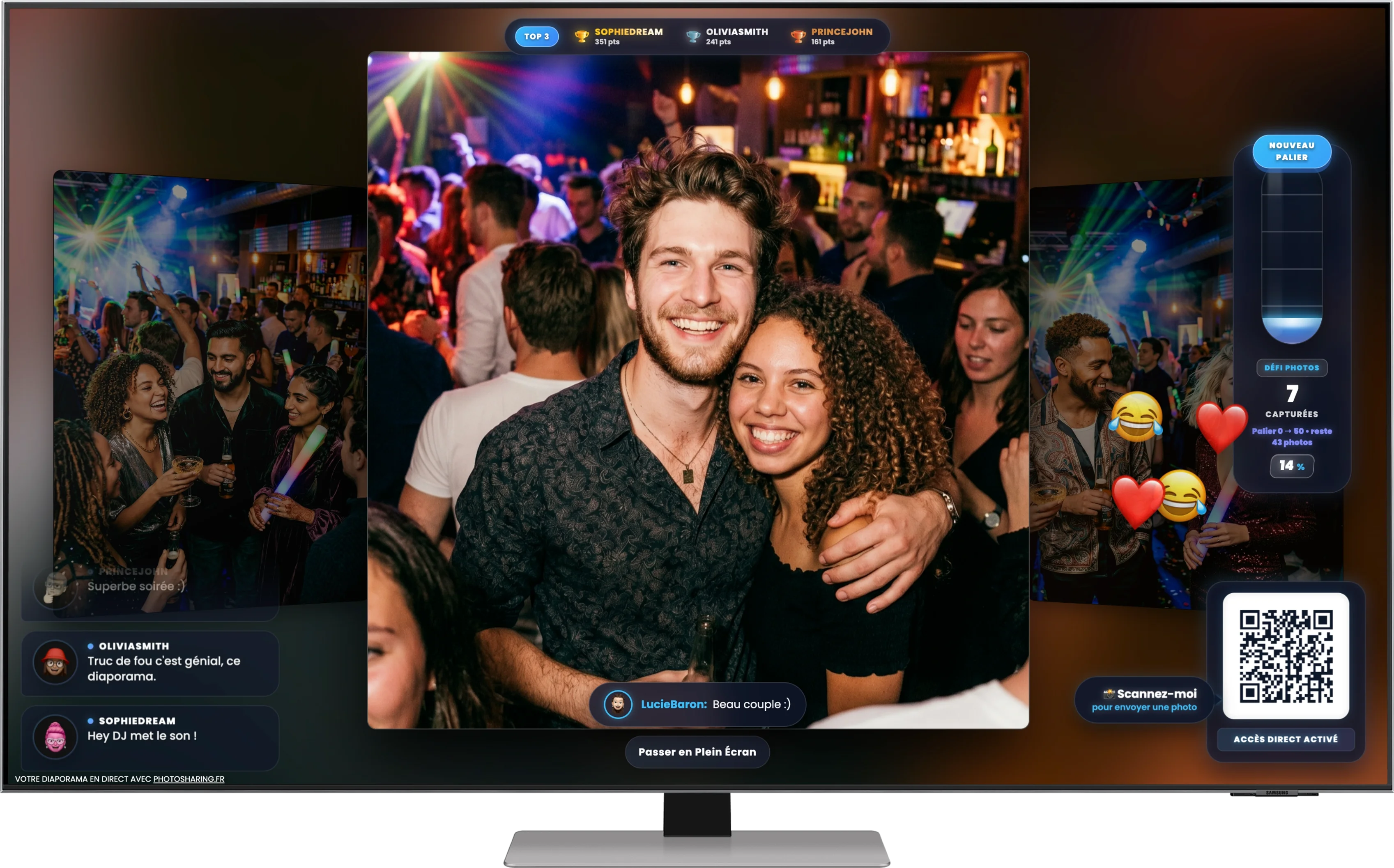
Apps like Slidypix turn a TV or projector into a collaborative slideshow fed by guests through a QR code. PhotoSharing may suit organizers who also want moderation, live interactions, rankings and a reusable gallery around the on-screen experience.
If you are searching for apps like Slidypix for events, you probably want more than a folder where guests leave their pictures. The practical goal is to display a QR code, let people contribute from their phones and bring those photos to life on a TV, projector or large screen while the event is still happening.
Slidypix is presented publicly as a collaborative live slideshow for weddings, birthdays and parties. PhotoSharing follows the same accessible principle—QR code participation without an app download—but may be an alternative when you also want comments, points, a Top 3 ranking, organizer controls and a gallery for the memories collected during the event.
The experience you are really choosing
The screen illustrated above captures the essential experience: a guest photo occupies the centre while a QR code, comments, reactions and a ranking encourage the room to participate. The value does not come from the display alone. It comes from the loop created between guests and the screen.
- A QR code or event link gives guests immediate access.
- They take a photo or select one from their phone.
- The content is sent to the event space and, depending on the moderation settings, appears in the live slideshow.
- Other guests react, comment or join the activity.
- The organizer retrieves the collected memories after the event.
This model can work for a wedding, birthday, private party or professional gathering. What changes from one platform to another is the depth of the animation, the organizer's level of control and what happens to the content after the screen is turned off.
Slidypix or PhotoSharing: two approaches to a collaborative slideshow
Based on its public presentation, Slidypix focuses on a browser-based collaborative slideshow: guests scan a QR code, upload photos and see them displayed on a large screen. Its published information also mentions live reactions, a digital guestbook, organizer settings, downloads, password protection and moderation depending on the selected package.
PhotoSharing can be considered when the live slideshow is the starting point rather than the entire activity. Guests can send photos and, according to the formula and configuration, videos, GIFs or messages. The display can include comments, reactions, points, photo challenges and a live ranking. The organizer manages modules, received media and moderation from a dashboard.
Neither approach should be chosen from a feature count alone. A focused slideshow may be sufficient for a small celebration. A more interactive configuration can make sense if you want the screen to become a recurring source of entertainment or need closer control before content is shown publicly.
How to choose an app like Slidypix
1. Make guest participation almost effortless
Guests should not need a long explanation. Check whether they can scan a visible QR code, open the experience in their mobile browser and upload from the camera or gallery without installing an application. PhotoSharing supports QR code or link access and requires no guest download.
2. Test the complete live-screen journey
A successful upload is only half the test. Connect a computer to the intended TV or projector, open the slideshow in a dedicated full-screen tab and send several photos from different phones. Confirm that the QR code remains readable and that new content reaches the screen reliably. A stable internet connection is important for live uploads and display updates.
3. Match moderation to the audience
At a private gathering, immediate display may create the most spontaneous atmosphere. At a corporate event or on a public screen, reviewing submissions first can be more appropriate. Slidypix publicly mentions moderation, including AI moderation in its offering. PhotoSharing allows the organizer to validate, delete, rotate or moderate content before display, depending on the chosen settings and formula.
4. Review privacy and post-event access
Ask who can join, who can view the gallery and how the album will be shared afterwards. PhotoSharing offers configurable access and a dedicated album that can be public or protected by a password. The organizer chooses its visibility and can share it by link or QR code. Downloads of individual files or the complete album are available according to the formula and configuration.
5. Decide whether you want a slideshow or broader animation
A simple rotation of guest photos may be exactly right. For a livelier party, you may want comments, chat, points, a Top 3, challenges or music-related activities. Choose only the modules that support your event; an uncluttered screen is usually easier for guests to understand.
Practical tip: run a rehearsal with the actual screen, internet connection and two guest phones. Test one camera photo, one gallery upload, moderation and full-screen display before designing signs or table cards around the QR code.What PhotoSharing can add around the live slideshow
The central photo, visible reactions and ranking shown on the participatory screen are closely aligned with PhotoSharing's event experience. Beyond that core display, three options may be particularly useful when comparing alternatives.
A dedicated online album
The content collected during the event can remain organized in an online album rather than disappearing when the slideshow ends. It can be shared with guests and configured as public or password-protected. Original HD files, the complete gallery, the online album and a souvenir video can be recovered according to the formula and configuration.
A connected photobooth using a tablet
A tablet and stand can become a self-service photo point without a complex booth. Guests can take individual pictures or create a four-pose animation. Filters and AI editing are available according to configuration, and approved results can join the main slideshow.
Optional music and party activities
For a DJ set or lively evening, PhotoSharing can combine the screen with a collaborative jukebox, DJ requests, karaoke or a Blind Test. These modules are optional: the organizer can activate or deactivate features from the dashboard to keep the experience appropriate for the audience.
From QR code to a screen that comes alive
PhotoSharing's setup follows a clear organizer journey:
- Create a test environment. A free demo at €0 can be requested without a payment method. An isolated instance is generally delivered automatically within 1 to 2 minutes.
- Prepare the event. Open the dashboard, configure access, choose the useful modules and personalize the QR code or downloadable A4 sign.
- Test as a guest. Scan the code on a smartphone, submit sample media and check the gallery, slideshow and moderation flow.
- Connect the display. Open the live slideshow on a computer connected to a TV, projector or large screen and use full-screen mode.
- Run and supervise. Follow participation and the network, then validate or remove content when moderation is enabled.
- Recover the memories. Download, publish, print or create a souvenir video using the available organizer tools, according to the formula and configuration.
The PhotoSharing help centre provides guidance on the demo, QR code, guest journey, screen display, media recovery and troubleshooting.
Which PhotoSharing plan fits your event?
The stated 2026 plans address three different patterns of use:
- Private Event — €20, one-time payment: intended for one wedding or birthday, with live photos, videos and GIFs, a large-screen slideshow and QR code, interactions, chat, ranking, HD originals, an online album and a souvenir video.
- Standard — €19.80 per month: intended for keeping an instance active and resetting it between recurring events. It includes unlimited guest uploads and connections, a complete dashboard and modules that can be activated as needed.
- Pro — €39.60 per month: intended for brand identity, moderation and collaboration. It includes custom logo, background and copyright, manual moderation, enhanced registration, 30-day statistics with AI, selected entertainment modules, advertising video, SSL subdomain, collaborators and an extended album.
You can review the PhotoSharing subscription options before deciding. For a special venue, public event or infrastructure requirement, contact the French support team to discuss the intended setup.
A practical pre-event checklist
- Confirm that the venue's internet connection can handle simultaneous uploads.
- Check the TV, projector, HDMI connection and full-screen browser view.
- Place the QR code where it remains visible without covering the main photos.
- Choose whether submissions appear immediately or require validation.
- Explain privacy, image rights and expected behaviour to participants.
- Decide who will supervise the dashboard during the event.
- Test the gallery and planned download process before the demo expires.
Frequently asked questions
Is PhotoSharing the same as Slidypix?
No. They are separate services built around a comparable use case: guests contribute through a QR code and photos appear in a live event slideshow. PhotoSharing may suit organizers who also want points, rankings, optional animation modules, dashboard controls and a configurable post-event album.
Do guests have to install an app?
No application download is required for PhotoSharing guests. They scan a QR code or open a link and participate from a mobile browser. Slidypix also publicly describes a browser-based, installation-free guest journey.
Can photos be moderated before appearing on screen?
Yes. PhotoSharing can use organizer validation and manual or intelligent moderation, depending on the formula and configuration. This is useful for corporate gatherings, public screens or any event where content should be reviewed before display.
Can PhotoSharing be tested before an event?
Yes. The free demo costs €0 and requires no payment method. It creates an isolated test instance, generally within 1 to 2 minutes, so you can try the dashboard, QR code, uploads, slideshow and guest experience.
Try the experience, not just the feature list
The right Slidypix alternative is the one that works smoothly with your guests, venue and display. If you want to evaluate PhotoSharing, create the free demo, scan its QR code from several phones and watch the test photos, comments and interactions reach the screen. You can then decide whether a simple slideshow or a broader participatory experience fits your event.
Create a free PhotoSharing demo at €0 — no payment method required.
FAQ
Is PhotoSharing the same as Slidypix?
No. They are separate services with a similar core use: QR code photo contributions displayed in a live event slideshow. PhotoSharing may fit organizers who also need rankings, optional animation modules, organizer controls and a configurable online album.
Do guests have to install an app?
No. PhotoSharing guests scan a QR code or open a link and participate from their mobile browser. Slidypix also publicly describes an installation-free browser journey.
Can photos be moderated before appearing on screen?
Yes. PhotoSharing supports organizer validation and manual or intelligent moderation depending on the formula and configuration.
Can I test PhotoSharing before my event?
Yes. A free demo costs €0 and requires no payment method. An isolated instance is generally delivered within 1 to 2 minutes so you can test the QR code, uploads, dashboard and slideshow.
Create an event
Un QR Code, des invités qui participent, et un diaporama qui donne vie à votre événement en direct.