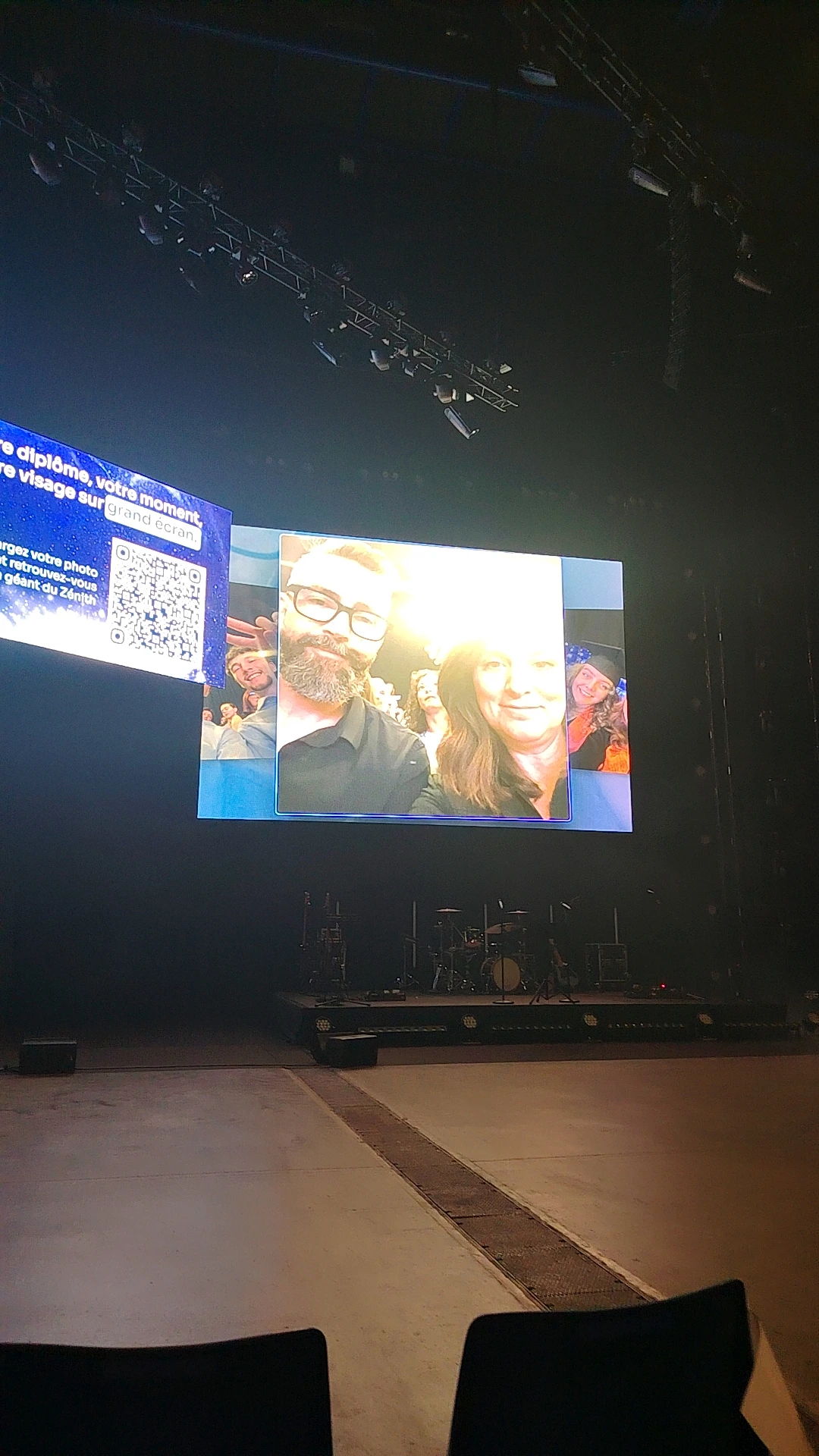
A QR code and a giant screen can turn guest selfies into a shared event experience without interrupting the programme. The hero image captures that workflow: a group photo is displayed above an empty stage while a nearby panel guides participation by QR code.
If you are researching apps like SelfieWall for events, the useful question is not which platform has the longest feature list. It is which one makes it easy for guests to contribute, gives the organiser enough control and turns those contributions into something worth displaying and keeping. SelfieWall is associated with a virtual photo wall where guests send images from their phones for projection as a live slideshow. PhotoSharing can be another option when you want QR-code access, browser-based participation, moderation and a gallery that continues the experience after the screen is switched off.
The hero image illustrates the core use clearly without tying it to a particular venue or occasion: a giant screen above an empty indoor stage displays a group selfie and additional portraits, while a side panel presents a QR code. That relationship between phone, participation prompt and large display is the practical standard against which any event photo-wall app should be assessed.
Short answer: choose according to the guest journey, live-display controls, moderation, post-event access and frequency of use. If you want to test the complete PhotoSharing journey before deciding, a free 0 EUR demo is available without a payment method.
What apps like SelfieWall are designed to do
A selfie wall removes the need to collect everyone’s pictures manually during an event. Guests use their phones to contribute photos, and selected content appears on a TV, projector or giant screen. The display becomes a shared focal point rather than a static presentation prepared in advance.
According to its public information, SelfieWall uses a personal hashtag and supports a projected slideshow, participant uploads, moderation or deletion, and downloading photos after the event. This approach may suit organisers looking primarily for a virtual photo wall. Other services can extend the same concept through QR-code access, configurable galleries or additional organiser controls. The right choice depends on which parts of the experience are essential for your event.
How to choose an app like SelfieWall
Start with the real conditions in the room. A feature only creates value if guests understand it quickly and the organiser can operate it while managing everything else.
1. Check the guest entry process
Count the actions between seeing the participation prompt and sending the first photo. A clear QR code or link generally reduces explanation. With PhotoSharing, guests scan the code and join through their mobile browser, with no application to download. Access can be configured according to the event settings.
2. Review the live-screen experience
Confirm that the service works with the display you intend to use, such as a TV, video projector or giant screen. Look beyond simple image rotation: check whether new contributions arrive live, whether the QR code remains visible and whether the layout is readable from the back of the room. The screen shown in the hero image is a useful reminder that visibility and instructions matter as much as the photos themselves.
3. Decide how much moderation you need
For a small private gathering, deleting an unsuitable image may be sufficient. A corporate event, public venue or large-format programme may require validation before anything appears. SelfieWall’s public description mentions moderation and deletion. PhotoSharing gives the organiser dashboard controls to validate, delete, rotate or moderate content before broadcast, depending on the formula and configuration.
4. Plan what happens after the slideshow
A live wall creates energy for a few hours, but the collected media may have longer value. Ask whether you can download the original files, how long they remain available and whether guests receive an online album. PhotoSharing can centralise content in a dedicated gallery, with individual or complete downloads and an album that can be public or password-protected. Availability of HD originals, the complete gallery and a souvenir video depends on the selected formula and configuration.
5. Match the service to one event or repeated use
A one-off birthday does not require the same setup as a venue, agency or company running events throughout the year. Compare the payment model, reset options, branding controls and collaboration tools in relation to your actual schedule rather than choosing a plan for hypothetical needs.
Practical tip: test with two phones and the actual display before guests arrive. Scan the QR code, upload different media, approve or remove a test image and check readability from several positions in the room.
From QR code to giant screen: the event flow
A well-designed photo wall should be understandable without a long announcement. The organiser prepares the access point and display; guests provide the content; the screen responds.
- Display the QR code. Place it on the main screen, printed signage or both. It should remain large enough to scan without guests approaching technical equipment.
- Let guests participate. With PhotoSharing, they open the event from their browser and can send photos, GIFs, videos or messages according to the enabled modules.
- Bring the screen to life. Approved content joins the live slideshow. The organiser can supervise activity and keep control of what is shown.
- Recover the memories. After the event, the organiser can manage the collected media and retrieve the available gallery, album, HD originals or souvenir video according to the formula and configuration.
This is the same visual logic suggested by the hero scene: a participation instruction sits beside a large display, and phone-generated portraits become part of the room. The technology stays in the background while the audience’s contributions become the programme.
When PhotoSharing fits the brief
PhotoSharing may be relevant when you want more than a stream of pictures but still need a simple entry point. Three aspects are particularly useful for this search intent.
Browser participation through a QR code
Guests do not need to search an app store or install software. They scan a QR code or follow a link, then participate from their smartphone browser. This keeps the first interaction short and makes the same process usable for weddings, birthdays, private parties and professional events.
Control from an organiser dashboard
The dashboard can be used to activate or deactivate modules, monitor participation and manage incoming content. Validation and moderation help protect a public screen from unsuitable or accidental uploads. The exact controls available depend on the formula and configuration.
A dedicated online album
The event does not have to end when the slideshow closes. PhotoSharing can provide a dedicated album shared by link or QR code. The organiser chooses its visibility, including public access or password protection, and available media can be downloaded individually or as a complete album.
Create a free 0 EUR PhotoSharing demo
The demo requires no payment method. An isolated event instance is generally prepared automatically in one to two minutes, allowing you to test the dashboard, guest upload flow, QR code and slideshow before activating it.
Choose a formula that matches your event rhythm
PhotoSharing’s communicated 2026 options distinguish a single private occasion from recurring or professionally branded use.
Private Event: one occasion
20 EUR, one-time payment. This formula is intended for a wedding or birthday and includes live photos, videos and GIFs, a large-screen slideshow, QR code, interactions, chat and ranking. It also provides access to HD originals, an online album and a souvenir video.
Standard: recurring events
19.80 EUR per month. Standard is designed for organisers who want to keep an instance active and reset it between several events. It includes unlimited guest submissions and connections, a complete dashboard and modules that can be activated according to need. Resetting remains available while the instance is active.
Pro: brand identity and advanced control
39.60 EUR per month. Pro is intended for identity customisation, moderation and collaboration. It includes personalised logo, background and copyright, manual moderation, strengthened registration, 30-day statistics with AI, selected entertainment modules, advertising video, SSL subdomain, collaborators and an extended album.
Options can depend on credits or configuration. Review the current details on the PhotoSharing plans page, or contact the French support team if your event involves public screens, specific volumes or infrastructure constraints.
A practical setup checklist
- Choose a TV, projector or giant screen that is readable from the audience area.
- Use a stable internet connection and test the guest network under realistic conditions.
- Keep the slideshow in a dedicated full-screen browser tab.
- Place the QR code on screen and on printed signage where useful.
- Upload sample photos from more than one smartphone.
- Configure moderation before opening access to guests.
- Decide whether the post-event album will be public or password-protected.
For a stage or large room like the one visible above, test the QR code from a distance and avoid placing important instructions near the edge of the display. If you need help with QR-code preparation, slideshow operation or media recovery, consult the PhotoSharing help centre.
Frequently asked questions
Are SelfieWall and PhotoSharing the same service?
No. They are separate event photo-sharing services. SelfieWall’s public presentation focuses on a hashtag-based virtual wall and projected slideshow. PhotoSharing may be considered as an alternative when QR-code browser access, configurable moderation and an online album match your priorities.
Do PhotoSharing guests need to install an app?
No. Guests can scan the event QR code or follow its link and participate through a smartphone browser. Access and account requirements can be configured by the organiser.
Can photos be checked before appearing on the screen?
Yes. PhotoSharing supports organiser controls and moderation before broadcast, including manual or intelligent moderation according to the formula and configuration. SelfieWall’s public information also states that photos can be moderated and deleted.
What equipment is needed for a live photo wall?
You need a display such as a TV, projector or giant screen, a device running the slideshow, internet access and guest smartphones. Test the connection, QR code, uploads and full-screen display before the event begins.
A low-pressure way to decide
SelfieWall may suit organisers looking for its hashtag-led photo-wall approach. PhotoSharing may fit those who prefer a QR-code browser journey, dashboard control and a dedicated album around the live slideshow. Instead of deciding from feature lists alone, reproduce the full guest journey with the free 0 EUR demo and judge how it works on your intended screen.
FAQ
Are SelfieWall and PhotoSharing the same service?
No. They are separate event photo-sharing services. SelfieWall publicly presents a hashtag-based virtual wall and projected slideshow, while PhotoSharing may be an alternative when QR-code browser access, moderation and an online album match your needs.
Do PhotoSharing guests need to install an app?
No. Guests scan the event QR code or follow a link and participate through their smartphone browser. Access requirements can be configured by the organiser.
Can photos be checked before appearing on the screen?
Yes. PhotoSharing supports organiser controls and moderation before broadcast, including manual or intelligent moderation according to the formula and configuration. SelfieWall’s public information also mentions moderation and deletion.
What equipment is needed for a live photo wall?
You need a TV, projector or giant screen, a device running the slideshow, internet access and guest smartphones. The complete QR-code, upload, moderation and display flow should be tested before the event.
Create an event
Un QR Code, des invités qui participent, et un diaporama qui donne vie à votre événement en direct.