Apps like Qlikki help guests contribute event photos through a QR code, but the experience can range from a shared album to a live interactive slideshow. PhotoSharing is an option for organisers who want photos, comments, reactions and rankings to bring a venue screen to life in real time.
If you are searching for apps like Qlikki for events, start by deciding what should happen after a guest scans the QR code. Do you mainly want to collect memories in a private gallery, or should each contribution also become part of a live room experience? PhotoSharing may be an alternative when your priority is a participatory screen where photos, messages, comments, reactions and rankings appear during the event—without asking guests to install an application.
What are you really looking for in a Qlikki alternative?
QR-based event platforms solve a practical problem: guests take valuable photos, but those images often remain scattered across phones and messaging groups. A shared access point makes participation easier and gives the organiser one place to recover the event memories.
The search for an alternative usually reflects one of three goals:
- Collection: receive photos and other contributions from guests in one gallery.
- Entertainment: display contributions on a TV, projector or large screen while the event is happening.
- Control: decide what appears publicly, manage modules and recover the resulting album after the event.
The right service is therefore not determined by the QR code alone. The guest journey, screen experience, moderation tools and post-event access matter just as much.
Qlikki and PhotoSharing: two event-sharing approaches
Based on its public presentation, Qlikki offers QR-code access without an application to install, along with a private digital album for photos, videos and written or audio messages. Its published packs also mention slideshows, photo challenges and, in some configurations, event-planning tools. That approach can suit organisers looking for a broad digital companion around an occasion.
PhotoSharing focuses particularly on turning an available screen into a live event activity. Guests scan a QR code or open a link in their browser, then send photos, videos, GIFs or messages according to the configuration. Validated content can join the live slideshow, while comments, reactions, points and a Top 3 can encourage further participation.
This is not a claim that one service is universally preferable. It shows why organisers should compare the actual event journey rather than treating every QR photo platform as interchangeable.
What a live participatory screen changes
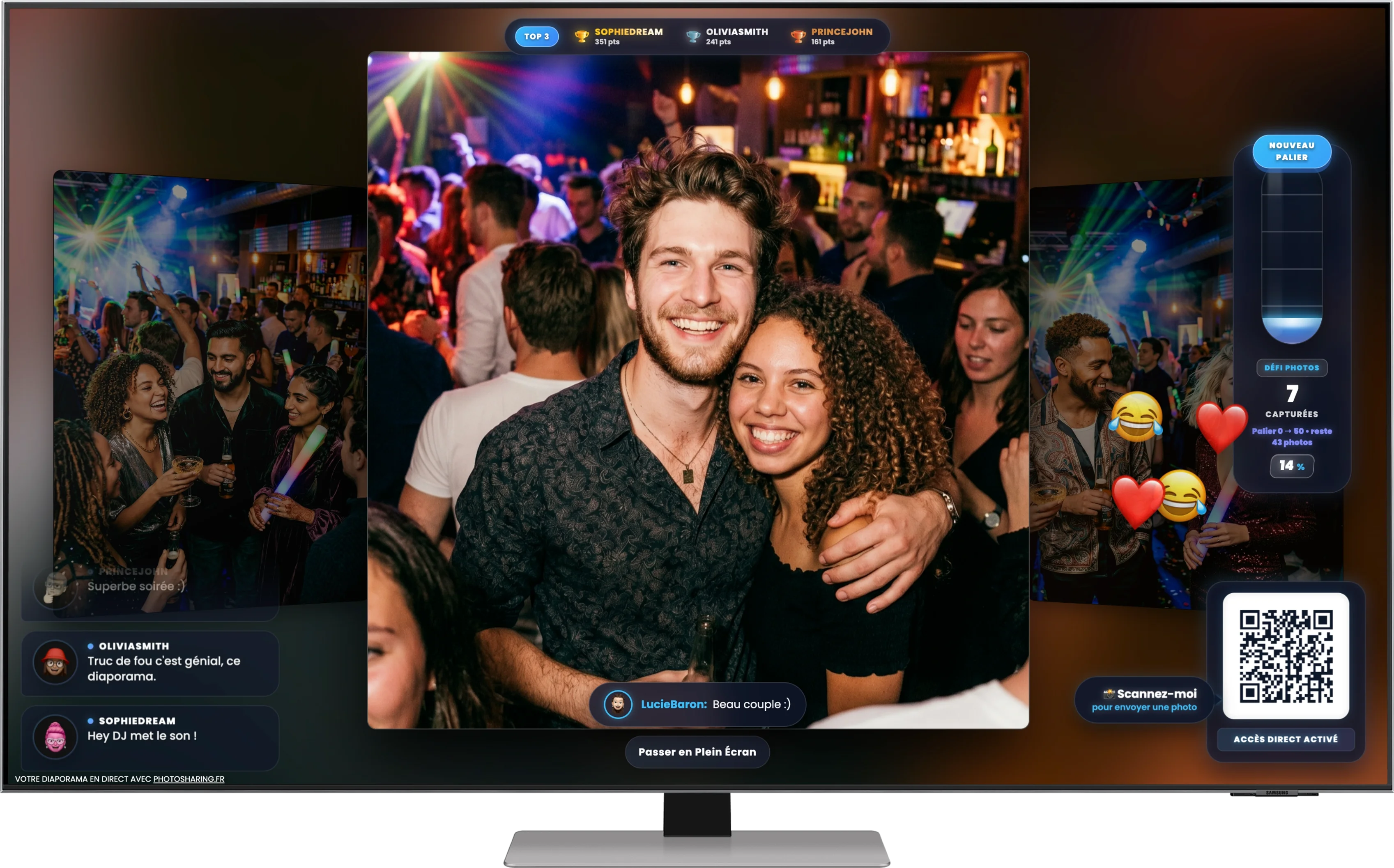
The hero visual captures the target experience clearly: a large screen displays a central party photo alongside comments, emoji reactions, progress indicators, a ranking and a prominent upload QR code. It does not document a particular client or venue; it illustrates how guest photography can become a collective activity.
Instead of waiting until the following day to browse an album, people can see the room's perspective develop during the celebration. A funny picture can trigger reactions, a photo challenge can provide a reason to contribute, and a live ranking can make participation playful. The display remains useful even for guests who prefer to watch rather than upload.
This distinction is important when evaluating apps like Qlikki. A gallery preserves the event; a live photo wall can also animate it. Some organisers need one outcome, while others want both.
How to choose an app like Qlikki
Use concrete event requirements rather than a long feature checklist. The following questions reveal which approach is likely to fit your setup.
- Will you have a screen? If a TV, projector or LED display is available, check whether the service offers a true live slideshow and a clear full-screen mode.
- How quickly can guests join? QR access through a mobile browser reduces friction. Test the journey on both iPhone and Android devices before the event.
- What can people submit? Decide whether photos are enough or whether you also need video, GIF, chat, comments or messages.
- Does public content require approval? For professional events, public venues or mixed audiences, moderation before display may be essential.
- Do you want collection or interaction? Albums serve memory sharing; reactions, challenges, points and rankings support live entertainment.
- What happens afterwards? Confirm how originals, galleries, complete downloads and souvenir outputs are recovered under the selected plan.
From QR scan to shared memories in four steps
1. Prepare the event instance
The organiser receives an isolated PhotoSharing environment containing the dashboard, guest access, media and display settings. Modules can be activated or disabled according to the planned experience.
2. Display the QR code
Place it on the large screen, an A4 poster or another visible event support. Guests scan it with their phones and enter through the browser, with no application download required.
3. Let the screen take part
Guests send photos and other enabled content. After validation when moderation is active, contributions can appear in the slideshow alongside comments, reactions, points or rankings. The organiser can monitor activity and manage the display from the dashboard.
4. Recover the event content
Afterwards, the organiser can manage the gallery and retrieve the memories. Original HD files, the complete gallery, an online album and a souvenir video are available according to the formula and configuration.
This path turns the QR code into more than an upload shortcut. It connects individual phones to a shared event display, then brings the resulting content back into an organised album.
Which PhotoSharing plan fits your event?
Pricing should be considered in relation to frequency, control and branding—not only the number of listed modules. The stated 2026 options are:
Private Event: €20, one-time payment
This formula is intended for a single wedding or birthday. It includes live photos, videos and GIFs, the large-screen slideshow and QR code, interactions, chat and ranking, plus recovery of original HD files, an online album and a souvenir video.
Standard: €19.80 per month
Standard is designed for recurring events. The instance remains active and can be reset between occasions while the subscription is active. It includes unlimited guest connections and submissions, a complete dashboard and modules that can be enabled as needed.
Pro: €39.60 per month
Pro is aimed at organisers who need brand identity, moderation and collaboration. It includes personalised logo, background and copyright, manual moderation, reinforced registration, 30-day statistics with AI, selected music and advertising modules, an SSL subdomain, collaborators and an extended album.
Some functions and options depend on the selected formula, credits and configuration. Review the current details on the PhotoSharing plans page before activating an event.
Three useful details beyond photo collection
A configurable online album
The dedicated album can be personalised for a private celebration or company event. The organiser chooses whether it is public or password-protected, shares it by link or QR code and controls visibility. Individual or complete-album downloads are available according to the setup.
A connected photobooth without a complex booth
A tablet placed on a support can become a self-service photo station. Guests can take individual pictures or create a four-pose animation, use filters or configured AI options, and send approved results to the live slideshow.
Access and moderation under organiser control
Guest access can be configured through a QR code or link. The organiser can validate, delete, rotate or moderate content before public display when required, helping adapt the same concept to a private party, workplace event or public-facing screen.
Try the live journey before making a decision
PhotoSharing provides a free demo at 0 EUR with no payment method required. A separate test instance is generally delivered automatically within one to two minutes, with the main access link sent by email. It lets you inspect the dashboard, customise the QR code, submit sample photos and open the slideshow before deciding whether to activate it.
The demo is temporary, so test media is removed when it expires. For setup guidance, visit the PhotoSharing help centre. If your event involves unusual infrastructure, several public screens or specific volume requirements, contact the PhotoSharing team to discuss the intended setup.
See how your event screen could work
Create the free demo, scan its QR code from a phone and send a few test pictures. This gives you a direct view of the guest, moderator and slideshow experience without installing an app or providing payment details.
FAQ about apps like Qlikki
Is PhotoSharing the same as Qlikki?
No. Both address QR-based event contributions without requiring guests to install an app, but their feature sets and event journeys differ. PhotoSharing places particular emphasis on live screen interaction, comments, reactions, points, rankings and organiser moderation.
Do guests have to create an account?
PhotoSharing offers a guest journey accessed by QR code or link. Depending on the organiser's access settings, guests can join quickly with or without account creation. Test the chosen settings in advance.
Can photos be approved before appearing on screen?
Yes. PhotoSharing supports organiser controls and manual or intelligent moderation. Content can be validated before joining a public slideshow, depending on the enabled configuration.
Can I test PhotoSharing before replacing or choosing Qlikki?
Yes. The PhotoSharing demo costs 0 EUR, requires no payment method and provides an isolated test instance, generally within one to two minutes. You can test QR access, uploads, moderation, the gallery and the live slideshow before activation.
FAQ
Is PhotoSharing the same as Qlikki?
No. Both support QR-based event contributions without requiring guests to install an app, but their feature sets differ. PhotoSharing focuses particularly on a live interactive screen with comments, reactions, points, rankings and organiser controls.
Do guests need to install an app or create an account?
No application download is required with PhotoSharing. Guests join through a QR code or link in their mobile browser. Account requirements depend on the guest-access settings selected by the organiser.
Can guest photos be moderated before appearing live?
Yes. PhotoSharing provides organiser controls and manual or intelligent moderation. Content can be reviewed before it reaches the public slideshow when the relevant settings are enabled.
Can I test PhotoSharing while comparing apps like Qlikki?
Yes. PhotoSharing offers a demo at 0 EUR with no payment method required. An isolated test instance is generally delivered within one to two minutes so you can try QR uploads, moderation, the gallery and the live slideshow.
Create an event
Un QR Code, des invités qui participent, et un diaporama qui donne vie à votre événement en direct.