Apps like Fotify help guests send photos to a shared event screen without interrupting the celebration. PhotoSharing may suit organizers who want the live slideshow to include comments, reactions, rankings and progress-based photo challenges.
If you are comparing apps like Fotify for events, begin with the experience you want to create rather than a long feature checklist. Do guests simply need to collect photos, or should their contributions animate a screen with comments, reactions and playful challenges? PhotoSharing is an option to consider when you want QR-based uploads, a live slideshow and an interactive layer that remains under the organizer’s control.
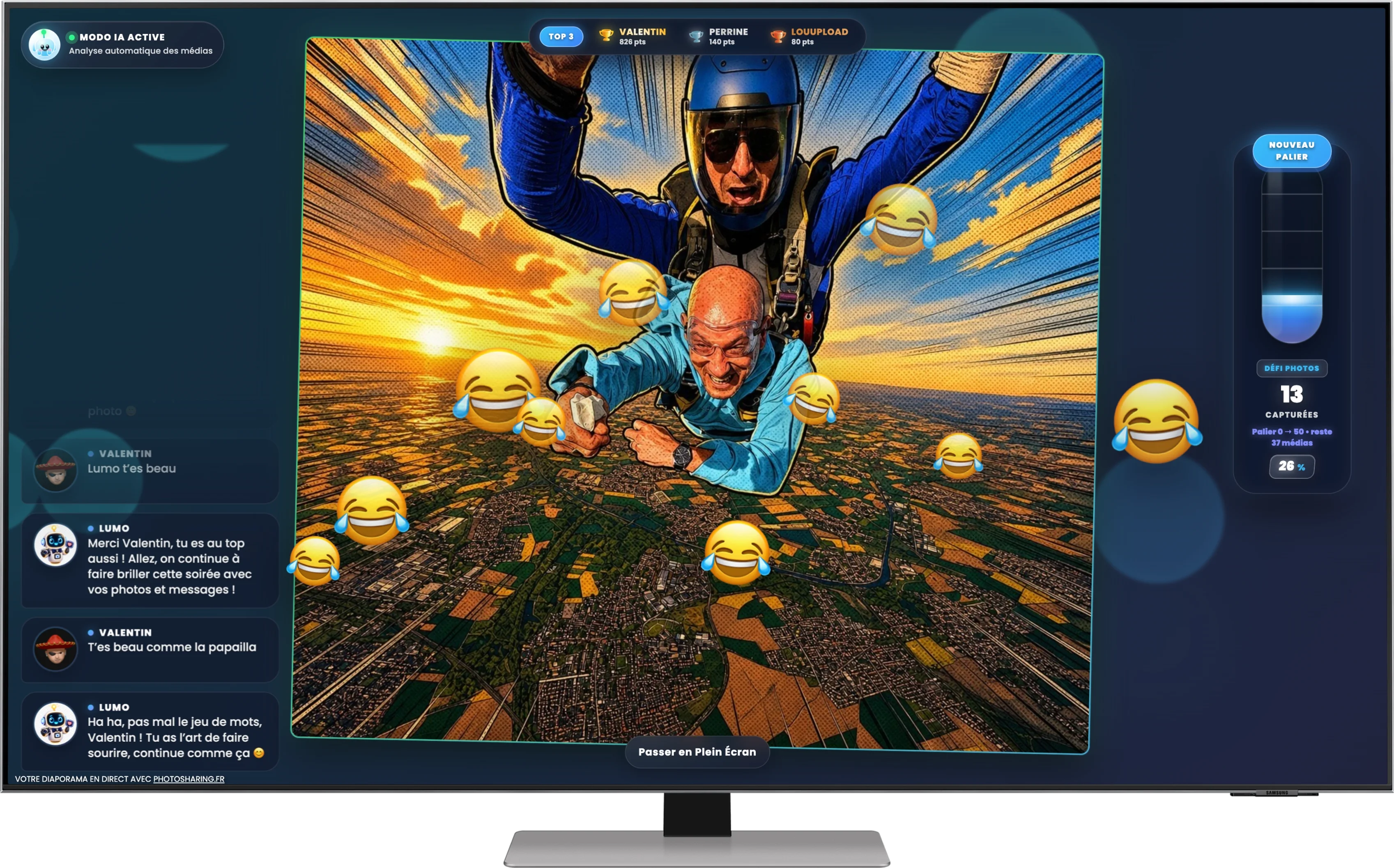
The hero visual captures that second approach: a monitor combines a spectacular free-fall image with laughing emojis, comments, a ranking and a progress gauge. It does not identify a particular event, but it clearly illustrates how an uploaded photo can become part of a shared, energetic screen experience.
Why compare apps like Fotify for events?
Fotify publicly presents a straightforward workflow based on a QR code, browser access without an app download, real-time guest photo uploads and a moderated photo wall. It also includes digital invitations and RSVP management, making it relevant when invitations and live photo sharing need to sit within the same event workflow.
Other organizers may prioritize what happens on the screen once the event begins. They might want to accept photos, videos, GIFs and messages, encourage participation with points, or retain an online album afterwards. The appropriate choice therefore depends on your event format, moderation needs and desired level of interaction—not on a universal ranking.
How to choose an app like Fotify
Use the following criteria to turn a broad comparison into a practical decision.
1. Check the guest entry process
Every extra step can reduce participation. Look for QR code or link access that opens directly in a mobile browser. Both Fotify’s public presentation and PhotoSharing support QR-based participation without requiring guests to download an application.
2. Decide what belongs on the live screen
A standard photo wall may be enough for a conference, private celebration or reception. For a more animated format, PhotoSharing can display a live slideshow alongside comments, reactions, chat, points, a Top 3 and rankings. Modules can be enabled or disabled by the organizer.
3. Review moderation before going public
Moderation matters when a slideshow is shown on a large screen. Fotify publicly mentions live moderation and AI filtering. PhotoSharing provides organizer controls for validating, deleting, rotating and moderating submissions before display, with manual or intelligent moderation depending on the formula and configuration.
4. Plan what happens after the event
Ask how the organizer will recover and share the contributions. Fotify advertises bulk ZIP downloads. With PhotoSharing, submitted media is centralized in a gallery, while HD originals, the complete gallery, an online album and a souvenir video can be recovered according to the selected formula and configuration.
5. Match interaction to the audience
A restrained wall can suit a formal gathering. A birthday, wedding reception, team activity or DJ evening may benefit from comments, challenges and rankings. The screen shown above demonstrates the principle: the photo remains central, while the interface turns viewing into collective participation.
Practical tip: test the complete journey with two phones and the screen you will use at the venue. Scan the code, submit a photo, moderate it, display it and download it afterwards. This reveals more than comparing feature names alone.From QR scan to shared screen in four steps
- Prepare the event: the organizer opens the dashboard, selects the required modules and prepares the QR code.
- Invite participation: guests scan the code with a smartphone and join through their browser, without installing an app.
- Bring the screen to life: submitted photos—and videos, GIFs or messages when configured—feed the live display after any required validation.
- Recover the memories: the organizer manages the gallery and retrieves available files, albums or souvenir outputs according to the formula.
This flow separates the guest’s simple action from the organizer’s controls. Guests can contribute quickly, while the person running the event retains authority over modules, visibility and moderation.
Two approaches to live event photo sharing
Fotify and PhotoSharing overlap around QR access, browser-based participation and real-time display, but their public presentations emphasize different use cases. This comparison is intended as a decision aid rather than a claim that one service is universally superior.
Decision criterionFotify’s public approachPhotoSharing approach Guest accessQR scan and no app downloadQR code or link, with configurable guest access and no app download Live displayReal-time moderated photo wallLive slideshow for a TV, projector or large screen ContributionsGuest photo uploadsPhotos, videos, GIFs and messages according to configuration EngagementReal-time photo sharingComments, reactions, chat, points, challenges and rankings Organizer toolsInvitations, RSVP tracking and photo-wall moderationDashboard, module controls, moderation and participation monitoring After the eventOrganized ZIP downloadsGallery, downloads, dedicated online album and souvenir video according to the formulaFotify may be appropriate if digital invitations and RSVP tracking are central to your preparation. PhotoSharing may fit if your priority is an event screen combining media with visible interaction and organizer-controlled modules. Privacy should also be checked: Fotify states that sharing can be kept away from public links, while PhotoSharing lets the organizer set album visibility and use a password-protected album when required.
What an interactive screen adds to an event
A live photo wall is not only a place to display files. When reactions, scores and progress appear around a submission, the screen gives guests a reason to look back, respond and contribute again. PhotoSharing develops this experience through three especially relevant elements.
A playful participation layer
Points, a Top 3, photo challenges, collective objectives, emojis and visual effects can turn uploads into an animation. These options are useful when the organizer wants active participation rather than a passive slideshow.
A dedicated online album
The album can be personalized for a wedding, birthday or company event. It may be public or password protected, shared by link or QR code, and configured for individual or complete-album downloads. The organizer chooses its visibility.
A connected photobooth without a complex booth
A tablet placed on a suitable support can become a self-service photo station. Guests can take individual pictures or create a four-pose animation, use filters or AI editing according to the configuration, and send validated results to the live slideshow.
Plans for one event or recurring use
PhotoSharing’s communicated 2026 pricing separates one-off private use from recurring and professional requirements:
- Événement privé — 20 EUR, one-time payment: intended for a wedding or birthday, with live photos, videos and GIFs, QR code access, a large-screen slideshow, interactions, chat, rankings, HD originals, an online album and a souvenir video.
- Standard — 19.80 EUR per month: designed to keep an instance active and reset it between several events. It includes unlimited guest submissions and connections, a complete dashboard and modules that can be activated as needed.
- Pro — 39.60 EUR per month: intended for visual identity, moderation and collaboration, with custom logo, background and copyright, strengthened registration, manual moderation, 30-day statistics with AI, collaborators and an extended album. Other listed modules apply according to need and configuration.
Certain options may depend on credits or the instance configuration. Review the current details on the PhotoSharing plans page before selecting a formula.
Test the real setup before event day
A free demo costs 0 EUR and requires no payment method. PhotoSharing prepares an isolated instance automatically, generally within one to two minutes, and sends the access link by email. You can then inspect the dashboard, customize the QR code, submit test media, open the slideshow and try moderation.
Run the test on the venue’s intended TV, projector or large screen, and check the available Wi-Fi or mobile connection. For detailed setup and troubleshooting guidance, consult the PhotoSharing help center. French support is available if you need assistance before, during or after the event.
Frequently asked questions
Is PhotoSharing a direct replacement for Fotify?
It can be an alternative depending on your priorities. Both support QR-based, no-download participation and live display. Fotify publicly emphasizes invitations and RSVPs, while PhotoSharing emphasizes interactive screen modules, multiple media formats, rankings and organizer controls.
Do guests need to install an application?
No. Guests scan a QR code or follow a link and participate through their smartphone browser. Access can be configured by the organizer, including guest mode and verification settings.
Can photos be moderated before appearing on screen?
Yes. PhotoSharing allows the organizer to validate, delete, rotate or moderate content before diffusion. Manual or intelligent moderation is available according to the chosen formula and configuration.
Can the shared gallery remain private?
Yes. The organizer controls album visibility. A PhotoSharing album may be public or protected by a password and can be shared through a link or QR code.
Try the workflow with your own screen
The most useful next step is to reproduce the guest journey before making a commitment. Create a free 0 EUR demo, submit a few test photos and check how the slideshow, moderation and gallery fit your event plan.
Create a free PhotoSharing demo or contact PhotoSharing to discuss a specific setup without pressure.
FAQ
Is PhotoSharing a direct replacement for Fotify?
PhotoSharing can be an alternative depending on your needs. Both offer QR-based participation without an app download and a live display. Fotify emphasizes invitations and RSVPs, while PhotoSharing focuses on interactive slideshow modules, varied media and organizer controls.
Do guests need to install an application?
No. Guests scan a QR code or follow a link and participate from their smartphone browser. The organizer can configure guest access and verification settings.
Can photos be moderated before appearing on screen?
Yes. PhotoSharing lets the organizer validate, delete, rotate and moderate content before display. Manual or intelligent moderation is available according to the formula and configuration.
Can the shared event gallery remain private?
Yes. The organizer chooses the album’s visibility. It can be public or password protected, then shared through a link or QR code.
Create an event
Un QR Code, des invités qui participent, et un diaporama qui donne vie à votre événement en direct.