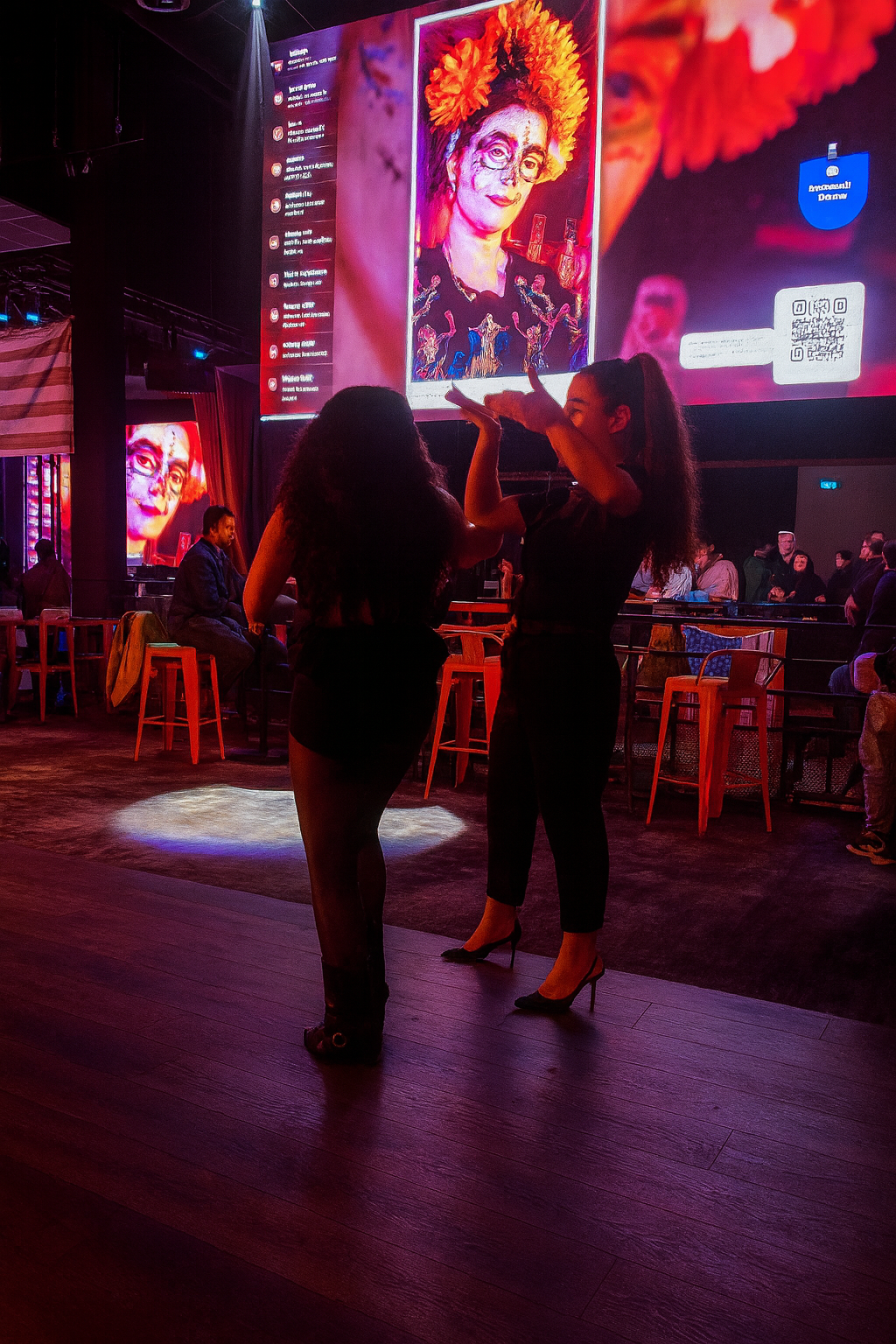
The large screen, social-style content and visible QR code illustrate what many event organizers want: a simple way for guests to participate from their phones while the room watches live. This guide compares Clickty’s publicly presented approach with PhotoSharing and explains how to choose according to access, display, moderation and gallery needs.
If you are researching apps like Clickty for events, the most useful comparison is not a long feature count. Start with the guest journey: how people join, what they can share, what appears on the venue screen and how the organizer controls and recovers the content.
The scene above captures that experience without tying it to a particular venue or occasion: people interact in a lively indoor space while a giant display presents visual content, a social-style column and a QR code. PhotoSharing follows this screen-first idea. Guests scan a QR code, join through their mobile browser and send photos, videos, GIFs or messages. The shared screen then becomes a live, participative part of the event, with no application download required for guests.
Want to test the complete journey? Create a PhotoSharing demo at 0 EUR without providing a payment method. An isolated instance is generally prepared in 1 to 2 minutes so you can try the QR code, uploads, dashboard and slideshow.
Why people search for apps like Clickty
Clickty’s public presentation focuses on event planning, photo sharing through a dedicated feed and a live slideshow connected to its Android and iOS application. That approach may suit organizers who want participants to join an app-based event space and keep current, upcoming and previous events together.
Other organizers are looking for a different participation path. They may want guests to scan a code without installing anything, review content before it reaches a public screen, or decide whether the resulting album is public or password-protected. The right alternative therefore depends on the experience you need—not on declaring one platform universally superior.
Clickty and PhotoSharing: two event participation paths
Both approaches connect guest contributions with an event experience, but they emphasize different workflows. This practical comparison uses only publicly presented functions and avoids a changing price-to-price ranking.
Decision criterionClickty’s public presentationPhotoSharing approachGuest accessAndroid and iOS application with invitations to join an event.QR code or link opening in the guest’s mobile browser, without an app download.Live displayA live photo slideshow connected to the application.A live slideshow for a TV, projector or giant screen, with guest photos and other enabled interactions.Event spaceA dedicated, secured photo feed and a view of current, future and completed events.An isolated event instance with a dashboard, guest interface, live screen and online gallery.Organizer controlThe public information provided here does not detail a moderation workflow, so organizers should verify the required settings directly.Manual or intelligent moderation, validation and removal controls are available according to the formula and configuration.After the eventThe public offer mentions saved event memories and the ordering of personalized souvenir products.Content can remain in a dedicated gallery; HD originals, the complete album and a souvenir video can be recovered according to the formula and configuration.If an app-based community and event-planning flow are central to your project, Clickty may remain relevant. If immediate browser access and detailed control of a venue screen matter more, PhotoSharing can be an alternative to test.
How to choose an app like Clickty
Write down what must happen during the first minute after a guest notices your QR code. This prevents attractive but secondary functions from distracting you from the actual event flow.
1. Check the joining experience
Consider whether participants are expected to download an application or should enter through their browser. A browser-based route removes the installation step: with PhotoSharing, the guest scans the displayed QR code or opens a link, then joins according to the access settings selected by the organizer.
2. Define the screen’s purpose
A slideshow can simply rotate through photos, or the screen can become a more active part of the room. PhotoSharing can display validated contributions and, when the relevant modules are enabled, support comments, reactions, chat, Wizz, points and rankings. Select only the interactions that fit the tone of your wedding, birthday, private party or professional event.
3. Decide how much control you need
A private family celebration and a display visible to a large public audience do not carry the same risk. Ask whether content should appear immediately or wait for approval. PhotoSharing gives the organizer a dashboard for activating modules and managing content, with moderation available according to the selected formula and configuration.
4. Plan the destination of the memories
Do not treat the live display as the end of the project. Decide who should be able to see the album later, whether downloads are needed and how long you intend to keep an active event environment. PhotoSharing’s dedicated online album can be shared by link or QR code and configured as public or protected by a password. The organizer chooses its visibility.
Practical tip
Run a three-device rehearsal: one phone uploads a photo, a second phone tests the guest link, and a computer opens the slideshow and dashboard. This reveals access, Wi-Fi and display issues before guests arrive.
What a QR code and large screen change in the room
A visible QR code gives guests one clear action. The large display then provides immediate context by showing that participation is collective rather than limited to one photographer’s camera. This is why a screen showing a portrait, a content stream and a scannable code is a useful model for planning: the interface must remain legible while people are talking, moving and watching from different distances.
The organizer should place the code both on the main screen and on accessible printed material when appropriate. The slideshow can run on a television, projector or giant display. For reliable scanning, keep the code large, use sufficient brightness and avoid placing it over a visually busy background.
How PhotoSharing works in four steps
- Display the access point. Open the slideshow and show the event QR code on the screen, or share the dedicated link.
- Let guests participate. They join from their mobile browser and send photos, videos, GIFs or messages according to the enabled modules.
- Bring the screen to life. Approved contributions join the live slideshow. Reactions and entertainment modules can be activated when suitable for the event.
- Recover the memories. The organizer manages the gallery and can recover the available originals, album and souvenir outputs according to the formula and configuration.
The key operational benefit is continuity: the QR code, guest upload interface, organizer controls, live display and gallery belong to the same event instance.
Three PhotoSharing strengths relevant to this choice
No application to install
Guests enter through a browser using a QR code or link. This is especially useful when the audience includes people who may not want to create another app-based routine for a single celebration or professional gathering.
Organizer control before public display
The dashboard can be used to activate or disable modules and manage submitted content. For events where a screen is highly visible, moderation helps the organizer decide what is suitable for the audience before publication.
A dedicated album with configurable visibility
The online album can continue the experience after the live screen is switched off. It can be shared through a link or QR code and made public or protected by a password, allowing the organizer to choose how the event memories circulate.
Which PhotoSharing formula fits your event pattern?
The communicated 2026 offers distinguish between a one-off private occasion, recurring event activity and a branded or moderated professional workflow. Some options depend on credits or configuration. Full details can be reviewed on the PhotoSharing subscription page.
Private Event: 20 EUR, one-time payment
This formula is intended for a wedding or birthday. It covers live photos, videos and GIFs, a large-screen slideshow and QR code, interactions, chat and ranking, recovery of HD originals, an online album and a souvenir video.
Standard: 19.80 EUR per month
Standard is designed for organizers who need to keep an instance active and reset it between multiple events. It includes unlimited guest uploads and connections, a complete dashboard, modules that can be activated as needed, and resets while the instance remains active.
Pro: 39.60 EUR per month
Pro is intended for identity customization, moderation and collaborative management. It includes personalized logo, background and copyright, manual moderation and strengthened registration, 30-day statistics with AI, karaoke, DJ requests, advertising video, an SSL subdomain, collaborators and an extended album.
If you only need one private celebration, start by considering Private Event. Standard corresponds to recurring use, while Pro addresses branding, moderation and team access rather than simply adding features for their own sake.
A practical setup checklist
- Confirm that the venue screen accepts your computer, casting device or video connection.
- Test the QR code from the approximate distance at which guests will see it.
- Check venue Wi-Fi and keep mobile data available as a fallback where possible.
- Choose immediate publication or moderation according to the audience and screen visibility.
- Send sample content and verify that it reaches both the dashboard and slideshow.
- Decide whether the final online album should be public or password-protected.
For troubleshooting involving camera permissions, uploads, access codes or a frozen slideshow, consult the PhotoSharing help center before the event.
Frequently asked questions
Is PhotoSharing the same as Clickty?
No. Clickty publicly presents an Android and iOS application combining event planning, a dedicated photo feed and a live slideshow. PhotoSharing uses a QR code or link to give guests browser access without downloading an app, with a dashboard, live screen and gallery.
Do guests have to install PhotoSharing?
No. Guests scan the event QR code or open its link on a smartphone. They participate from the browser according to the access settings selected by the organizer.
Can photos be reviewed before they appear on screen?
Yes. PhotoSharing supports organizer controls and moderation before diffusion. Manual or intelligent moderation is available according to the formula and configuration.
Which plan should I choose for a one-off event?
The Private Event offer costs 20 EUR as a one-time payment and is intended for a wedding or birthday. Standard at 19.80 EUR per month suits recurring events, while Pro at 39.60 EUR per month is intended for branding, moderation and collaboration.
Try the screen-first experience before deciding
The right choice depends on whether you prefer Clickty’s publicly presented app and event-feed model or a browser-based QR journey centered on the venue screen. PhotoSharing can be tested through a free 0 EUR demo without a payment method, giving you a real isolated instance rather than a static presentation.
Test it with your own devices: open the dashboard, scan the QR code, upload sample photos and watch the slideshow. If you need guidance for a private, recurring or professional setup, contact PhotoSharing without any pressure to activate immediately.
FAQ
Is PhotoSharing the same as Clickty?
No. Clickty publicly presents an Android and iOS application combining event planning, a dedicated photo feed and a live slideshow. PhotoSharing provides browser access through a QR code or link, with a dashboard, live screen and gallery.
Do guests have to install PhotoSharing?
No. Guests scan the event QR code or open its link on a smartphone and participate from their browser according to the organizer’s access settings.
Can photos be reviewed before they appear on screen?
Yes. PhotoSharing supports organizer controls and moderation before diffusion. Manual or intelligent moderation is available according to the formula and configuration.
Which plan should I choose for a one-off event?
The Private Event offer costs 20 EUR as a one-time payment and is intended for a wedding or birthday. Standard at 19.80 EUR per month suits recurring events, while Pro at 39.60 EUR per month addresses branding, moderation and collaboration.
Create an event
Un QR Code, des invités qui participent, et un diaporama qui donne vie à votre événement en direct.