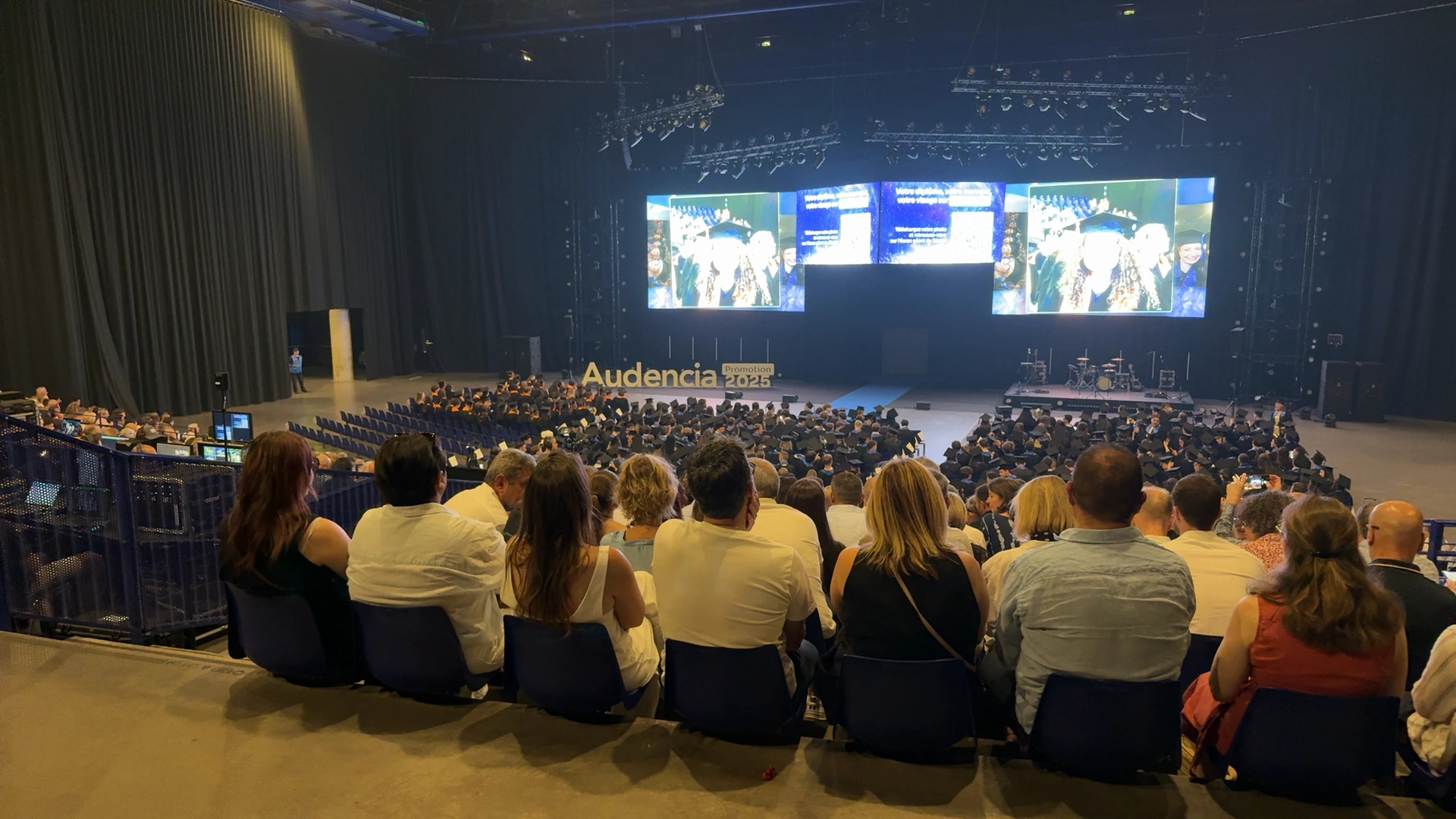
A packed auditorium facing panoramic screens illustrates how event photography can become part of a shared ceremony rather than remain on individual phones. PhotoSharing may be an alternative to PhotoLiveShow when you need QR code participation, organizer controls and a gallery after the event.
If you are looking for an alternative to PhotoLiveShow, PhotoSharing is an option to consider for turning a TV, projector or large venue screen into a participatory photo experience. Guests scan a QR Code, contribute photos and other enabled media from their phones, and watch the screen come to life without downloading an application.
The auditorium pictured above shows hundreds of attendees facing a stage equipped with panoramic screens. It does not establish that the displayed photographs were uploaded live, but it clearly illustrates the value of visual content in a collective ceremony: images can connect the audience to the program, celebrate participants and make a large room feel more personal.
The right platform therefore depends on more than projection alone. Guest access, moderation, privacy, post-event retrieval and the organizer's level of control should all be reviewed before making a decision.
Why a shared event screen changes the experience
In a large auditorium, wedding venue or company hall, guests can easily become passive spectators. A shared photo screen creates a visible point of participation. Instead of asking people to send files after the event, the organizer gives them a simple contribution path while the gathering is still taking place.
The screen can support different moments without replacing the official program. It might display spontaneous guest photographs during a reception, approved images between ceremony segments or a collaborative slideshow during an evening celebration. The practical objective remains the same: bring distributed phone photos into one controlled experience.
- For guests: a short, understandable path from QR Code to contribution.
- For the room: visual content designed for a TV, projector or large screen.
- For the organizer: centralized media and a clearer way to manage what is displayed.
How PhotoSharing works from scan to souvenir
PhotoSharing follows a straightforward event journey. The organizer opens the slideshow on the chosen display and makes the event QR Code visible. Guests scan it with their smartphones and join through their browser, with no application to install. Depending on the modules enabled, they can submit photos, videos, GIFs or messages.
Submitted content can feed the live slideshow and the event gallery. The organizer manages the experience from a dashboard, where modules can be activated or disabled and media can be validated, removed, rotated or moderated before public display. This is especially useful when a screen is prominent, as in an auditorium ceremony, a corporate event or a reception attended by several generations.
After the event, original HD files, the complete gallery, an online album and a souvenir video can be recovered according to the selected plan and configuration. The experience therefore covers both immediate participation and the practical task of collecting memories.
PhotoLiveShow or PhotoSharing: how to choose
PhotoLiveShow publicly presents a QR code photo slideshow with access that does not require guests to install an app or create an account. It emphasizes immediate projection and collecting event photographs in one place. PhotoSharing addresses the same broad need while adding documented organizer workflows that may matter when control, gallery visibility or additional creation options are priorities.
Start with the risk level of the screen
A private birthday slideshow does not require the same controls as a public screen in a seminar or ceremony. If every contribution may appear in front of a large audience, check whether you can review media before publication, remove unsuitable content and block problematic access. Do not assume that a QR Code alone solves editorial or image-rights questions.
Decide what should remain afterwards
If the screen is only an animation, a simple downloadable collection may be sufficient. If guests should revisit and share the event, examine gallery access, password protection, individual downloads and complete-album retrieval. PhotoSharing lets the organizer choose between public and password-protected album visibility.
Practical advice
Run a complete rehearsal using the actual display and network. Scan the QR Code as a guest, upload several files, review them from the dashboard and confirm how they appear in full-screen mode. This short test is more valuable than comparing feature lists in isolation.
Set up the participatory slideshow in four steps
- Prepare the organizer space. Request the free PhotoSharing demo and open the isolated event instance delivered by email. Delivery generally takes 1 to 2 minutes.
- Configure access and display. Download the QR Code poster, open the slideshow in a dedicated browser tab and connect the computer to the TV, projector or venue screen.
- Test the guest journey. Scan the code with a smartphone, join through the browser and submit sample media. Check camera permissions and use a stable Wi-Fi or mobile connection.
- Define publication rules. Activate only the necessary modules, choose whether moderation is required and explain clearly where the QR Code can be found.
For an auditorium or another large format, plan where the code will appear. A code shown only on a distant stage screen may be difficult to scan, so printed signs or additional displays can support access. Keep a technical operator or organizer close to the dashboard when content is being published publicly.
Which PhotoSharing plan fits your event pattern?
The communicated 2026 offer separates a one-off private event from recurring and professional use. Functions may depend on credits or configuration, so review the plan details before activation.
Événement privé (Private Event): one occasion
At 20 EUR, one-time payment, this plan is intended for a wedding or birthday. It includes live photos, videos and GIFs, a large-screen slideshow and QR Code, interactions, chat and ranking, retrieval of HD originals, an online album and a souvenir video.
Standard: recurring events
At 19.80 EUR per month, Standard is designed for keeping an instance active and resetting it between several events. It includes unlimited guest submissions and connections, the complete dashboard, modules that can be activated as needed, and resets while the instance remains active.
Pro: identity, moderation and collaboration
At 39.60 EUR per month, Pro is intended for organizers who need branding, stronger control or collaborative management. It includes customized logo, background and copyright, manual moderation and reinforced registration, 30-day statistics with AI, selected entertainment modules, advertising video, an SSL subdomain, collaborators and an extended album.
See the PhotoSharing subscription options for the plan path, or contact the team when planning a public event or a format with specific infrastructure.
Three PhotoSharing capabilities worth examining
1. Organizer-led moderation
Prominent screens demand more control than a private phone gallery. PhotoSharing allows the organizer to validate, delete, rotate or moderate content before diffusion. Manual or intelligent moderation can be used according to the plan and configuration, helping protect the tone of ceremonies, professional events and public-facing displays.
2. A dedicated online album
The album can extend the experience after the screen is turned off. It may be public or protected by a password, shared by link or QR Code, and configured for individual or complete-album downloads. The organizer chooses its visibility, which is useful when photographs should remain within an invited group.
3. A tablet-based photobooth
A tablet and a support can become a connected self-service photo point without a complex booth installation. Guests can take individual photos or create a four-pose animation, apply available filters and send approved results to the slideshow. This can complement smartphone contributions at an entrance, reception area or social space.
A relevant format for ceremonies and large audiences
The hero photograph appears to show a graduation-style ceremony, with many attendees in academic caps facing group photographs on large screens. In this kind of environment, the technology should support the program rather than distract from it. Moderated contributions can be reserved for interludes, arrival periods or the social gathering that follows.
The same principle applies to weddings, birthdays and company events: make participation visible, keep the instructions short and let the organizer decide what reaches the public display. For further preparation guidance, consult the PhotoSharing help centre.
Try the workflow before committing
PhotoSharing offers a free demo at 0 EUR with no payment method required. A dedicated test instance is generally prepared in 1 to 2 minutes, allowing you to explore the dashboard, QR Code, uploads, slideshow, gallery and moderation workflow.
Frequently asked questions
Is PhotoSharing a direct replacement for PhotoLiveShow?
It can be an alternative, but the two services should not be treated as identical. Both address QR code photo contribution and live event display. PhotoSharing may suit organizers who also want documented moderation controls, configurable gallery privacy or a tablet photobooth. Test the real guest and organizer journeys before deciding.
Do guests have to install an application?
No. Guests can scan the PhotoSharing QR Code or open the event link and participate through their smartphone browser. Access can be configured by the organizer, including the use of guest mode according to the event settings.
Can photos be reviewed before appearing on the large screen?
Yes. PhotoSharing supports organizer validation and moderation before diffusion. Manual or intelligent options are available according to the plan and configuration. This is particularly relevant for corporate events, ceremonies and screens visible to the public.
Can PhotoSharing be tested with the actual event equipment?
Yes. The free 0 EUR demo requires no payment method and provides an isolated instance that is generally delivered in 1 to 2 minutes. You can connect it to your intended TV, projector or large screen and test the QR Code, network, uploads and display before activating an event plan.
FAQ
Is PhotoSharing a direct replacement for PhotoLiveShow?
It can be an alternative, but the services should not be considered identical. Both address QR code photo sharing and live event display. PhotoSharing may suit organizers who also need documented moderation, configurable gallery privacy or a tablet photobooth.
Do guests have to install an application?
No. Guests scan the PhotoSharing QR Code or open an event link and participate through their smartphone browser. Guest access can be configured by the organizer.
Can photos be reviewed before appearing on the large screen?
Yes. PhotoSharing supports organizer validation and moderation before diffusion. Manual or intelligent moderation is available according to the plan and configuration.
Can PhotoSharing be tested with the actual event equipment?
Yes. The free demo costs 0 EUR and requires no payment method. An isolated instance is generally delivered in 1 to 2 minutes, so you can test the QR Code, uploads and slideshow on your intended display.
Create an event
Un QR Code, des invités qui participent, et un diaporama qui donne vie à votre événement en direct.